# EventReference.cs
**URL:** https://qa.fmod.com/t/eventreference-cs/20298
**Category:** Unity
**Created:** [June 8, 2023, 3:12pm UTC](https://qa.fmod.com/t/eventreference-cs/20298 "2023-06-08T15:12:28Z")
**Posts on this page:** 11
**Page:** 1
### Author:  [@saynizesis](https://qa.fmod.com/u/saynizesis)
#### Post date: [June 8, 2023, 3:12pm UTC](https://qa.fmod.com/t/eventreference-cs/20298/1 "2023-06-08T15:12:28Z")
Is there any reason why `Path` is only available in the Editor but not in the build version?
And any reason why we have two `ToString()` methods which gives your different result based on the execution in Editor/Build?

---
### Author:  [@saynizesis](https://qa.fmod.com/u/saynizesis)
#### Post date: [June 8, 2023, 11:32pm UTC](https://qa.fmod.com/t/eventreference-cs/20298/2 "2023-06-08T23:32:20Z")
`RuntimeManager.CreateInstance(EventReference param);` does not work in the build version at all, `EventReference ` is a sinner for some reasons, but we use raw string paths instead, everything works just fine
---
### Author:  [@Connor\_FMOD](https://qa.fmod.com/u/Connor_FMOD)
#### Post date: [June 9, 2023, 12:00am UTC](https://qa.fmod.com/t/eventreference-cs/20298/3 "2023-06-09T00:00:00Z")
Hi,
What version of Unity and FMOD are you using?
---
### Author:  [@saynizesis](https://qa.fmod.com/u/saynizesis)
#### Post date: [June 9, 2023, 12:43am UTC](https://qa.fmod.com/t/eventreference-cs/20298/4 "2023-06-09T00:43:44Z")
unity version is 2021.3.20f1, fmod version is 2.02.13
Everything works in the editor but not in webgl build
---
### Author:  [@saynizesis](https://qa.fmod.com/u/saynizesis)
#### Post date: [June 9, 2023, 1:02am UTC](https://qa.fmod.com/t/eventreference-cs/20298/5 "2023-06-09T01:02:17Z")
UPDATE: raw string of path does not work as well
---
### Author:  [@saynizesis](https://qa.fmod.com/u/saynizesis)
#### Post date: [June 9, 2023, 1:04am UTC](https://qa.fmod.com/t/eventreference-cs/20298/6 "2023-06-09T01:04:54Z")
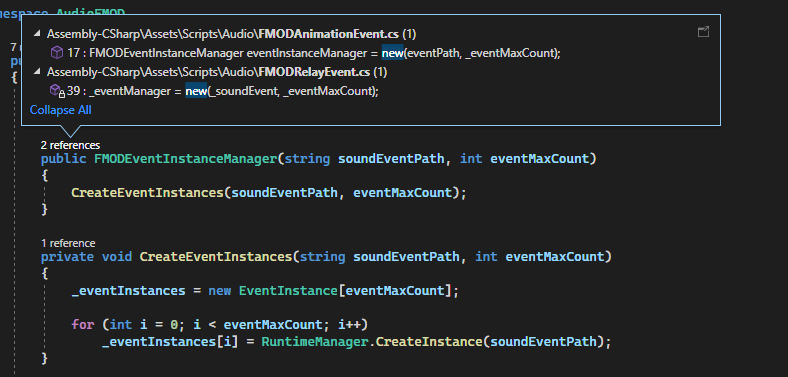
the snipped of code that throws me the error, it happens when I use `RuntimeManager.CreateInstance`
Before that I tried to use `EventReference.Guid` and `ToString()` but it did not work, I also tried to edit `EventReference` code to use Path even outside `UNITY_EDITOR` but it still does not work, it literally can’t find event by raw string path and string GUID and play instantiate the sound in the build version
---
### Author:  [@Connor\_FMOD](https://qa.fmod.com/u/Connor_FMOD)
#### Post date: [June 9, 2023, 5:20am UTC](https://qa.fmod.com/t/eventreference-cs/20298/7 "2023-06-09T05:20:41Z")
Hi,
Thank you for that information.
> [@saynizesis](#):
>
> Is there any reason why `Path` is only available in the Editor but not in the build version?
We do have the reason under [Unity Integration | Scripting API Reference | Common](https://fmod.com/docs/2.02/unity/api-common.html#eventreference). In summary “At runtime only the event’s GUID is stored, as this is the most efficient way to look up an event. In the editor, the event’s path is stored as well, to enable a more user-friendly UI.”
> [@saynizesis](#):
>
> And any reason why we have two `ToString()` methods which gives your different result based on the execution in Editor/Build?
This is a common API practice, could you elaborate on how you were trying to use it and we may be able to find an alternative?
> [@saynizesis](#):
>
> `RuntimeManager.CreateInstance(EventReference param);` does not work in the build version at all,
Would it be possible to see a full code snippet of how you are using this function in the build? I was able to get an `Event Instance` playing using an `Event Reference`.
> **My Code**
>
> ```auto
> public FMODUnity.EventReference eventReference;
> private FMOD.Studio.EventInstance eventInstance;
>
> // Start is called before the first frame update
> void Start()
> {
> eventInstance = FMODUnity.RuntimeManager.CreateInstance(eventReference);
>
> if (!eventInstance.isValid())
> Debug.LogError("Failed to create Instance");
> else
> Debug.Log("Successfully created the Instance");
>
> FMOD.RESULT result = eventInstance.start();
> if (result != FMOD.RESULT.OK)
> Debug.LogError(result.ToString());
>
> result = eventInstance.release();
> if (result != FMOD.RESULT.OK)
> Debug.LogError(result.ToString());
> }
>
> ```
> [@saynizesis](#):
>
> it literally can’t find event by raw string path and string GUID and play instantiate the sound in the build version
What are the errors you are seeing when it fails to start the event?
---
### Author:  [@saynizesis](https://qa.fmod.com/u/saynizesis)
#### Post date: [June 9, 2023, 7:22am UTC](https://qa.fmod.com/t/eventreference-cs/20298/8 "2023-06-09T07:22:15Z")
Sure, there is my AudioManager which is just loads the banks

Here is my script that calls `FMODEventInstanceManager`
> **FMODRelayEvent**
>
> ```auto
> using FMODUnity;
> using Sigtrap.Relays;
> using System.Reflection;
> using UnityEngine;
> using AudioFMOD;
>
> public class FMODRelayEvent : MonoBehaviour
> {
> [SerializeField] private EventReference _soundEvent;
> [SerializeField] private int _eventMaxCount = 1;
> [Tooltip("The script that containes event that will trigger the sound, the event shold be always called \"SoundEvent\"")]
> [SerializeField] private MonoBehaviour _listenEvent;
>
> private Relay _relayEvent;
> private FMODEventInstanceManager _eventManager;
>
> private void Start()
> {
> if (_listenEvent == null)
> {
> Debug.LogError("FMODRelayEvent: No listen event set!");
> return;
> }
> else
> {
> FieldInfo field = _listenEvent.GetType().GetField("SoundEvent", BindingFlags.Public | BindingFlags.Instance);
> if (field != null && field.FieldType == typeof(Relay))
> {
> _relayEvent = (Relay)field.GetValue(_listenEvent);
> _relayEvent?.AddListener(PlayOnEvent);
> }
> else
> {
> Debug.LogError(string.Concat($"FMODRelayEvent: No listen event was found in {_listenEvent}! Make sure your Relay event is set to public"));
> return;
> }
> }
>
> _eventManager = new(_soundEvent, _eventMaxCount);
> }
>
> private void PlayOnEvent()
> {
> _eventManager.PlayEvent(transform);
> }
>
> private void OnDestroy()
> {
> _relayEvent?.RemoveListener(PlayOnEvent);
> _eventManager.Release();
> }
> }
>
> ```
And here is `FMODEventInstanceManager`
> **FMODEventInstanceManager**
>
> ```auto
> using FMOD.Studio;
> using FMODUnity;
> using System.ComponentModel;
> using UnityEngine;
>
> namespace AudioFMOD
> {
> public class FMODEventInstanceManager
> {
> private EventInstance[] _eventInstances;
> private int _currentEventIndex;
>
> public FMODEventInstanceManager(EventReference soundEventPath, int eventMaxCount)
> {
> CreateEventInstances(soundEventPath, eventMaxCount);
> }
>
> public FMODEventInstanceManager(string soundEventPath, int eventMaxCount)
> {
> CreateEventInstances(soundEventPath, eventMaxCount);
> }
>
> private void CreateEventInstances(EventReference soundEventPath, int eventMaxCount)
> {
> _eventInstances = new EventInstance[eventMaxCount];
> for (int i = 0; i < eventMaxCount; i++)
> _eventInstances[i] = RuntimeManager.CreateInstance(soundEventPath);
>
> }
>
> private void CreateEventInstances(string soundEventPath, int eventMaxCount)
> {
> _eventInstances = new EventInstance[eventMaxCount];
>
> for (int i = 0; i < eventMaxCount; i++)
> _eventInstances[i] = RuntimeManager.CreateInstance(soundEventPath);
> }
>
> // Method to start event playback, updating 3D attributes and cycling the event index
> public void PlayEvent(Transform transform)
> {
> _eventInstances[_currentEventIndex].set3DAttributes(RuntimeUtils.To3DAttributes(transform));
> _eventInstances[_currentEventIndex].start();
> _currentEventIndex = (_currentEventIndex + 1) % _eventInstances.Length;
> }
>
> // Method to release all event instances
> public void Release()
> {
> foreach (EventInstance eventInstance in _eventInstances)
> {
> eventInstance.stop(FMOD.Studio.STOP_MODE.IMMEDIATE);
> eventInstance.release();
> }
>
> _eventInstances = null;
> }
> }
> }
>
> ```
And here is what I get in the build with the current code (see the picture) and also the GUID of the event I try to instance, and this happens only with `FMODRelayEvent.cs` meaning `FMODEventInstanceManager` works correctly because it’s being used by another script which handles animation, I also tried to replicate the same issue in Test unity project and it worked


({e39425d9-e5cd-4ae2-a114-efeba9749cc2})
---
### Author:  [@saynizesis](https://qa.fmod.com/u/saynizesis)
#### Post date: [June 9, 2023, 9:13am UTC](https://qa.fmod.com/t/eventreference-cs/20298/9 "2023-06-09T09:13:46Z")
How can I fresh reinstall FMOD plugin for unity? I noticed that it doesn’t update banks in `StreamingAssets` folder anymore
---
### Author:  [@saynizesis](https://qa.fmod.com/u/saynizesis)
#### Post date: [June 9, 2023, 9:39am UTC](https://qa.fmod.com/t/eventreference-cs/20298/10 "2023-06-09T09:39:07Z")
I changed my script event script to
```auto
using FMODUnity;
using Sigtrap.Relays;
using System.Reflection;
using UnityEngine;
using AudioFMOD;
public class FMODRelayEvent : MonoBehaviour
{
[SerializeField] private EventReference _soundEvent;
[SerializeField] private int _eventMaxCount = 1;
[Tooltip("The script that containes event that will trigger the sound, the event shold be always called \"SoundEvent\"")]
[SerializeField] private MonoBehaviour _listenEvent;
private Relay _relayEvent;
private FMODEventInstanceManager _eventManager;
private void Start()
{
if (_listenEvent == null)
{
Debug.LogError("FMODRelayEvent: No listen event set!");
return;
}
else
{
FieldInfo field = _listenEvent.GetType().GetField("SoundEvent", BindingFlags.Public | BindingFlags.Instance);
if (field != null && field.FieldType == typeof(Relay))
{
_relayEvent = (Relay)field.GetValue(_listenEvent);
_relayEvent?.AddListener(PlayOnEvent);
}
else
{
Debug.LogError(string.Concat($"FMODRelayEvent: No listen event was found in {_listenEvent}! Make sure your Relay event is set to public"));
return;
}
}
_eventManager = new(_soundEvent, _eventMaxCount);
}
private void PlayOnEvent()
{
_eventManager ??= new(_soundEvent, _eventMaxCount);
_eventManager.PlayEvent(transform);
}
private void OnDestroy()
{
_relayEvent?.RemoveListener(PlayOnEvent);
_eventManager.Release();
}
}
```
and it started working, seems like there was an issue that banks did not load on Awake() and I initialized Events on Start()
---
### Author:  [@Connor\_FMOD](https://qa.fmod.com/u/Connor_FMOD)
#### Post date: [June 12, 2023, 11:52pm UTC](https://qa.fmod.com/t/eventreference-cs/20298/11 "2023-06-12T23:52:55Z")
Hi,
Thanks for sharing the solution.