# FMOD 2.02.33 - Issue with DSP plugin for PS5/PSVR2 SDK 11.000
**URL:** https://qa.fmod.com/t/fmod-2-02-33-issue-with-dsp-plugin-for-ps5-psvr2-sdk-11-000/24142
**Category:** Unity
**Tags:** unity, ps5
**Created:** [March 26, 2026, 9:12pm UTC](https://qa.fmod.com/t/fmod-2-02-33-issue-with-dsp-plugin-for-ps5-psvr2-sdk-11-000/24142 "2026-03-26T21:12:16Z")
**Posts on this page:** 2
**Page:** 1
### Author:  [@Bowl](https://qa.fmod.com/u/Bowl)
#### Post date: [March 26, 2026, 9:12pm UTC](https://qa.fmod.com/t/fmod-2-02-33-issue-with-dsp-plugin-for-ps5-psvr2-sdk-11-000/24142/1 "2026-03-26T21:12:16Z")
- Unity version 6000.1.17f1
- FMOD Studio installed version and FMOD Unity package 2.02.33
- PlayStation SDK 11
Evening Forum!
Im trying to integrate FMOD in a PSVR2(PS5) app and got stuck at the plugin setup.
Installed fmodstudio20233.unitypackage and fmodstudio20233ps5\_sdk11.000.unitypackage in the project, succesfully loaded FMOD banks and im able to see and reproduce events from FMOD’s event browser with no issues at all, configured a dynamic plugin in ‘Assets\Plugins\FMOD\platforms/ps5/lib/’ and checked it’s configuration:


But when i try to play the app in Unity’s editor or in the PS5 dev-kit after building the app, i get the following errors:
- Unity Editor errors
[FMOD] PluginFactory::loadPlugin : No FMOD symbols found in dynamic library ‘D:\Unity\_Projects\xxxxxxx\xxxxxxx\Assets\Plugins\FMOD\platforms/win/lib/x86\_64/fmodstudio.dll’

[FMOD] Initialization failed : Loading plugin ‘fmodstudio’ from ‘D:\Unity\_Projects\xxxxxxxx\xxxxxxxxx\Assets\Plugins\FMOD\platforms/win/lib/x86\_64/fmodstudio.dll’ : ERR\_FILE\_NOTFOUND : File not found.

PS5 Devkit error:
01:27:13 SystemNotInitializedException: [FMOD] Initialization failed : Loading plugin ‘fmodstudio’ from ‘/app0/Media/Plugins/libfmodstudio.prx’ : ERR\_FILE\_NOTFOUND : File not found.
01:27:13 at FMODUnity.RuntimeManager.get\_Instance () [0x00000] in \<00000000000000000000000000000000\>:0
01:27:13 at FMODUnity.RuntimeManager.SetListenerLocation (System.Int32 listenerIndex, UnityEngine.GameObject gameObject, UnityEngine.GameObject attenuationObject) [0x00000] in \<00000000000000000000000000000000\>:0

A colleague with some experience with PS5 apps mentioned he never had to set up a dynamic plugin in FMOD, but he never worked on a PSVR2 project.
But if i leave the dynamic plugin empty FMOD generates the following error:
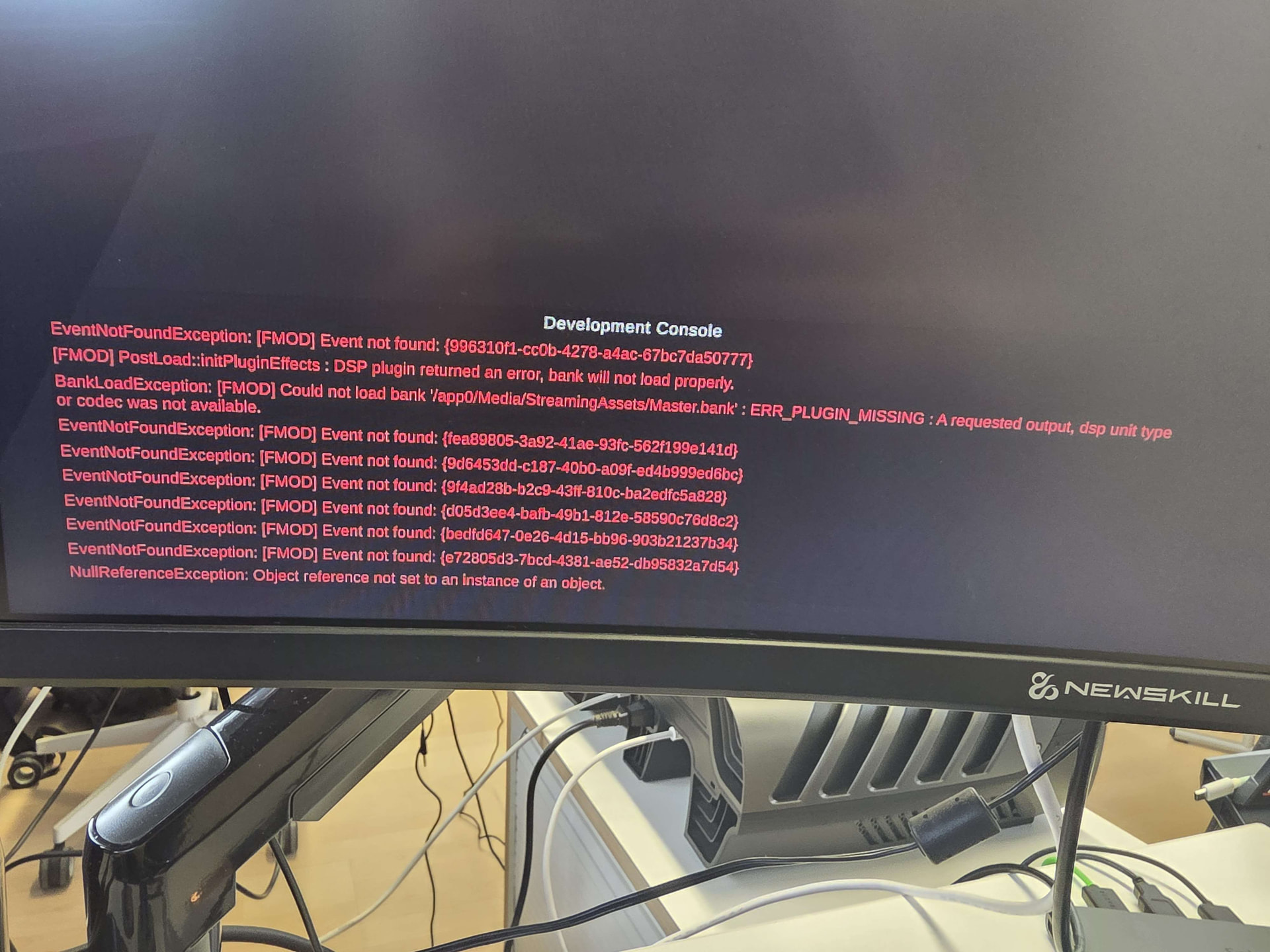
After all my tests, i can’t guess why FMOD does not find the dynamic plugin.
I’ve noticed that in the Editor’s error, the path of the plugin is pointing to the win folder inside plugin platform’s folder instead of PS5; but, i rechecked the config several times and seems ok.
The project is configured as PS5, the platform configured in Unity’s FMOD is PS5

Anyone had to deal with this before?
---
### Author:  [@li\_fmod](https://qa.fmod.com/u/li_fmod)
#### Post date: [April 2, 2026, 5:06am UTC](https://qa.fmod.com/t/fmod-2-02-33-issue-with-dsp-plugin-for-ps5-psvr2-sdk-11-000/24142/2 "2026-04-02T05:06:39Z")
Hi,
Thank you for sharing the information and screenshots.
> [@Bowl](#):
>
> [FMOD] Initialization failed : Loading plugin ‘fmodstudio’ from ‘D:\Unity\_Projects\xxxxxxxx\xxxxxxxxx\Assets\Plugins\FMOD\platforms/win/lib/x86\_64/fmodstudio.dll’ : ERR\_FILE\_NOTFOUND : File not found.
`fmodstudio` is not a DSP plugin, but the FMOD Studio runtime library itself. Adding it as a dynamic plugin will cause FMOD to try to load it as a DSP plugin, which may result in errors like this.
> [@Bowl](#):
>
> But if i leave the dynamic plugin empty FMOD generates the following error:
This suggests that your banks are actually referencing a real [dynamic plugin](https://www.fmod.com/docs/2.03/unity/plugins.html#dynamic-plugins), which is currently not being loaded.
From your screenshots, I can see that your project includes: `libresonanceaudio.prx`
It is possible that your banks are using Resonance Audio, so you may want to try setting the dynamic plugin to: `resonanceaudio`
Let me know if the issue persists.