# Parameter Audio Pitch Increase Effect (Like a Car) Implementation
**URL:** https://qa.fmod.com/t/parameter-audio-pitch-increase-effect-like-a-car-implementation/19045
**Category:** Unity
**Tags:** unity, csharp
**Created:** [July 23, 2022, 3:41pm UTC](https://qa.fmod.com/t/parameter-audio-pitch-increase-effect-like-a-car-implementation/19045 "2022-07-23T15:41:13Z")
**Posts on this page:** 2
**Page:** 1
### Author:  [@JohnGreska](https://qa.fmod.com/u/JohnGreska)
#### Post date: [July 23, 2022, 3:41pm UTC](https://qa.fmod.com/t/parameter-audio-pitch-increase-effect-like-a-car-implementation/19045/1 "2022-07-23T15:41:13Z")
Hello! I’ve got a BB-like character that I’m trying to make, like, audio pitches up the faster it’s going and it pitches back down if it goes slower. In the FMOD event, I have it ranged from 0-50, the range of the character’s velocity, with the audio changing the higher the velocity is:
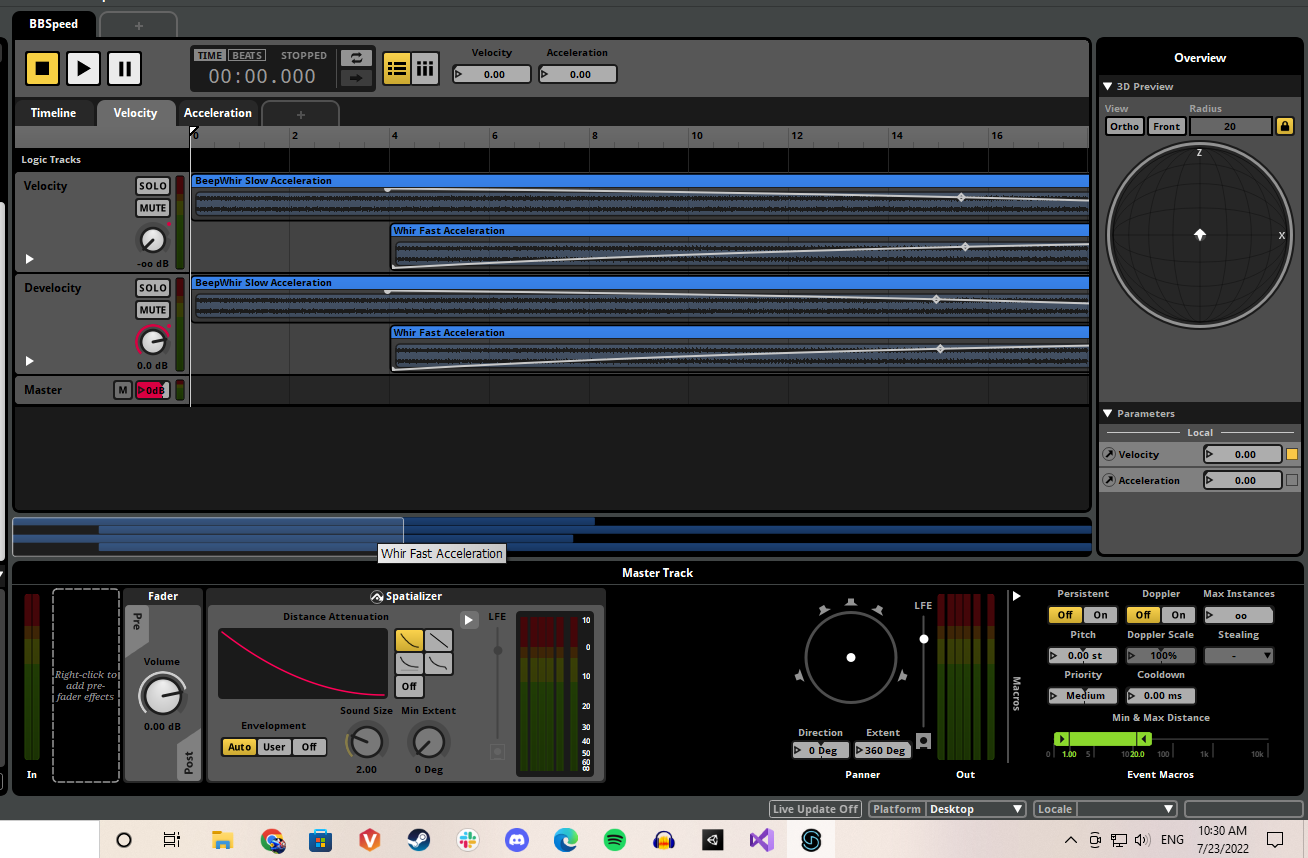
It works in FMOD when I drag the slider while it’s playing.
The script I created for implementation is below. It’s inside the movement logic script, so I removed the stuff that is filler for this forum, like WASD movement and all that:
```auto
public class MovementLogic : MonoBehaviour
{
//Acceleration BB
private FMOD.Studio.EventInstance BBCar;
public FMODUnity.EventReference fmodEvent;
private float test;
[SerializeField]
[Range(0f, 50f)]
private float acceleration, audiovelocity;
public float velocity;
void Start()
{
BBCar = FMODUnity.RuntimeManager.CreateInstance(fmodEvent);
BBCar.start();
}
void Update()
{
audiovelocity = velocity;
BBCar.setParameterByName("Velocity", audiovelocity);
BBCar.getParameterByName("Velocity", out test);
Debug.Log(test);
}
}
```
Velocity was already a variable in the script created for actual movement speed, I didn’t want to use it for also the FMOD velocity, just to be safe, so I created ‘audiovelocity’ and assigned velocity to that variable. ‘Acceleration’ is a parameter that I made for FMOD too, but I wanted to implement it first to see if the velocity would work. I wasn’t having much luck implementing it, so I created a gerParameter after setParameter to see if it was getting anything, and it was. Regardless, no sound occurs, even when the slider moves in Unity and I get Debug logs like crazy showing that it is getting the parameter.
Any help would be appreciated, I figured this was the logical way to implement it but I guess not.
EDIT 1: I’ve been working on it all day, and in-the editor it still doesn’t work. But when I build the game, it will work, but only within the radius of where the character starts. So. That’s odd.
---
### Author:  [@Connor\_FMOD](https://qa.fmod.com/u/Connor_FMOD)
#### Post date: [July 27, 2022, 4:24am UTC](https://qa.fmod.com/t/parameter-audio-pitch-increase-effect-like-a-car-implementation/19045/2 "2022-07-27T04:24:31Z")
Hi,
A solution may be instead of creating the `EventInstance` yourself, try using `FMODUnity.StudioEventEmitter`, explained further in [Unity Integration | Game Components](https://fmod.com/docs/2.02/unity/game-components.html#studio-event-emitter), as it will take care of a lot of preparation for us and we still get all the same functionality. The `EventEmitter` looks like this in Unity

Once you’ve added the `Emitter` to your object you’ll want to update your code as follows:
> **Code changes**
>
> ```auto
> private void Start()
> {
> // Retrieving the EventEmitter Object
> // By using the EventEmitter Object we will also solve the problem with the sound position not updating with the car
> emitter = GetComponent();
>
> // If there are problems with the event FMOD will log its own errors but it is always best to do your own debugging too
> if (emitter.EventInstance.isValid() == true)
> Debug.Log("Instance is valid");
> else
> Debug.Log("Instance is not valid");
> }
>
> void Update()
> {
> // Assginging your velocity
> audiovelocity = velocity;
>
> // A super useful FMOD debugging tool which gives insights to how functions have run
> FMOD.RESULT result;
>
> // Now we want to assign our parameter by the velocity
> result = emitter.EventInstance.setParameterByName("Velocity", audiovelocity);
>
> if (result != FMOD.RESULT.OK)
> Debug.Log("There was an error setting parameter with result " + result);
> else
> Debug.Log("Successfully assigned parameter");
> }
>
> ```
The meaning of each `FMOD.RESULT` is further explained under [Core API | Common](https://fmod.com/docs/2.02/api/core-api-common.html#fmod_result)
I hope this helps!