# \[Unity Visual Scripting\] Cannot change emitter's instance after the reference has changed
**URL:** https://qa.fmod.com/t/unity-visual-scripting-cannot-change-emitters-instance-after-the-reference-has-changed/23412
**Category:** Unity
**Tags:** unity
**Created:** [September 30, 2025, 4:34am UTC](https://qa.fmod.com/t/unity-visual-scripting-cannot-change-emitters-instance-after-the-reference-has-changed/23412 "2025-09-30T04:34:57Z")
**Posts on this page:** 5
**Page:** 1
### Author:  [@Ormalawayo](https://qa.fmod.com/u/Ormalawayo)
#### Post date: [September 30, 2025, 4:34am UTC](https://qa.fmod.com/t/unity-visual-scripting-cannot-change-emitters-instance-after-the-reference-has-changed/23412/1 "2025-09-30T04:34:58Z")
I cannot figure out how to play more than 2 events with a Studio Event Emitter in my Script Graph:
I can set the reference and it updates _that_, I can see it in the inspector. But nothing I do can set this emitter’s Event Instance to anything.
I stopped, released it, then set the reference like normal, didn’t work.
I turned the component off, set the reference, then turned it back on again, didn’t work.
I tried releasing _after_ setting the reference, didn’t work.
I tried manually creating an instance, it gave a warning saying `EventInstance.set3DAttributes()` wasn’t called yet, and also didn’t set the instance anyway.
I stopped, released, set reference, cleared handle, didn’t work.
I stopped, set reference, released, cleared handle, didn’t work.
I stopped, set reference, cleared handle, didn’t work
---
### Author:  [@li\_fmod](https://qa.fmod.com/u/li_fmod)
#### Post date: [October 2, 2025, 12:06am UTC](https://qa.fmod.com/t/unity-visual-scripting-cannot-change-emitters-instance-after-the-reference-has-changed/23412/2 "2025-10-02T00:06:39Z")
Hi,
Thank you for sharing the information!
Could you please share a screenshot of your current Script Graph? That’ll help confirm the node order and settings.
> [@Ormalawayo](#):
>
> I cannot figure out how to play more than 2 events with a Studio Event Emitter in my Script Graph:
>
> I can set the reference and it updates _that_, I can see it in the inspector. But nothing I do can set this emitter’s Event Instance to anything.
Changing the event reference on a `Studio Event Emitter` won’t swap what’s already playing. The emitter only creates an instance once, and then keeps reusing it, which means just changing the reference field won’t do anything.
If you want to play different events, or have multiple running at the same time, the easier path is to skip the emitter and use [event instance nodes](https://fmod.com/docs/2.03/unity/user-guide.html#create-and-play-a-2d-event-instance) instead. That way you can spawn new sounds whenever you like and have full control.
> [@Ormalawayo](#):
>
> I tried manually creating an instance, it gave a warning saying `EventInstance.set3DAttributes()` wasn’t called yet, and also didn’t set the instance anyway.
That’s expected when you create a 3D instance manually but don’t attach/set its 3D data. Here’s n example of [playing 3d sound](https://fmod.com/docs/2.03/unity/user-guide.html#create-and-play-a-3d-event-instance) via visual scripting.
---
### Author:  [@Ormalawayo](https://qa.fmod.com/u/Ormalawayo)
#### Post date: [October 2, 2025, 1:59am UTC](https://qa.fmod.com/t/unity-visual-scripting-cannot-change-emitters-instance-after-the-reference-has-changed/23412/3 "2025-10-02T01:59:22Z")
> [@li\_fmod](#):
>
> Could you please share a screenshot of your current Script Graph?
Here’s a picture of a version that tries the basic method of swapping events, and in the same image (because of the New User perk: “Nuh-uh-uh! One image at a time!”) what gets called on start, _it_ plays the same emitter from that variable:
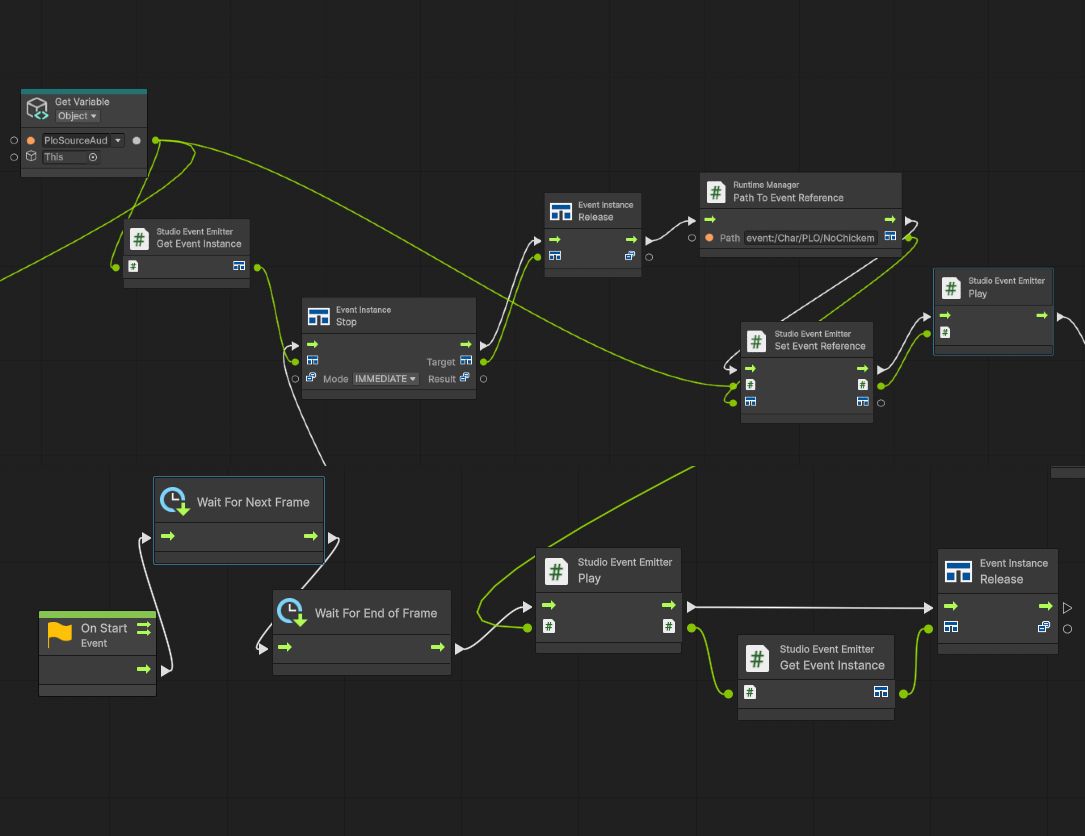
Aside from an unrelated oneshot, it doesn’t do anything else with FMOD, which is good because that whole Script Graph is literally too big to take a reasonable screenshot of.
> [@li\_fmod](#):
>
> the easier path is to skip the emitter and use [event instance nodes](https://fmod.com/docs/2.03/unity/user-guide.html#create-and-play-a-2d-event-instance) instead.
- I wanted to do it for consistency of every other character (they don’t use Visual Scripting)
- There’s an outside C# script that does basic lip-syncing using that emitter, and I don’t want to make it work with instances, especially since it’s a generic script for other scenarios than this.
> [@Ormalawayo](#):
>
> they don’t use Visual Scripting
Oh yeah, the reason this is the only character that does this is because it’s for the beginning of the game, and it’s way easier to make the whole sequence. I think I’ve gone too far in to turn the Script Graph into C#
> [@Ormalawayo](#):
>
> I tried manually creating an instance, it gave a warning saying `EventInstance.set3DAttributes()` wasn’t called yet, and also didn’t set the instance anyway.
I actually don’t know what I was trying to do at this point I think I was desperate
---
### Author:  [@li\_fmod](https://qa.fmod.com/u/li_fmod)
#### Post date: [October 3, 2025, 6:23am UTC](https://qa.fmod.com/t/unity-visual-scripting-cannot-change-emitters-instance-after-the-reference-has-changed/23412/5 "2025-10-03T06:23:42Z")
Thank you for sharing the screenshots, it’s super helpful!
The built-in `StudioEventEmitter` is designed as a simple “one-event player.” It caches the event description the first time you play it, and it won’t refresh if you change the `EventReference` during runtime.
A similar discussion can be found here: [Changing a SudioEventEmitter's Event During Runtime - #2 by Leah\_FMOD](https://qa.fmod.com/t/changing-a-sudioeventemitters-event-during-runtime/19532/2)
If you need to swap events at runtime, you could consider using an extended version of the emitter, for example:
```auto
using FMODUnity;
public class StudioEventEmitterEx : StudioEventEmitter
{
///
/// Change the event at runtime and refresh the cached description.
///
public void SetEventAndRefresh(EventReference newEventRef)
{
// Stop current instance immediately
AllowFadeout = false;
Stop();
// Assign new event
EventReference = newEventRef;
// Clear the cached description so next Play() will do Lookup()
if (eventDescription.isValid())
{
eventDescription.clearHandle();
}
}
}
```
This adds a method that clears the cached description and refreshes the reference, so calling it before `Play()` ensures the new event is used.
Since you’re using Visual Scripting, you may need to run **FMOD \> Generate Visual Scripting Units** again for the new method to appear.
Here’s an example graph:

Hope this helps! Let me know if you have questions.
---
### Author:  [@Ormalawayo](https://qa.fmod.com/u/Ormalawayo)
#### Post date: [October 3, 2025, 11:24am UTC](https://qa.fmod.com/t/unity-visual-scripting-cannot-change-emitters-instance-after-the-reference-has-changed/23412/6 "2025-10-03T11:24:02Z")
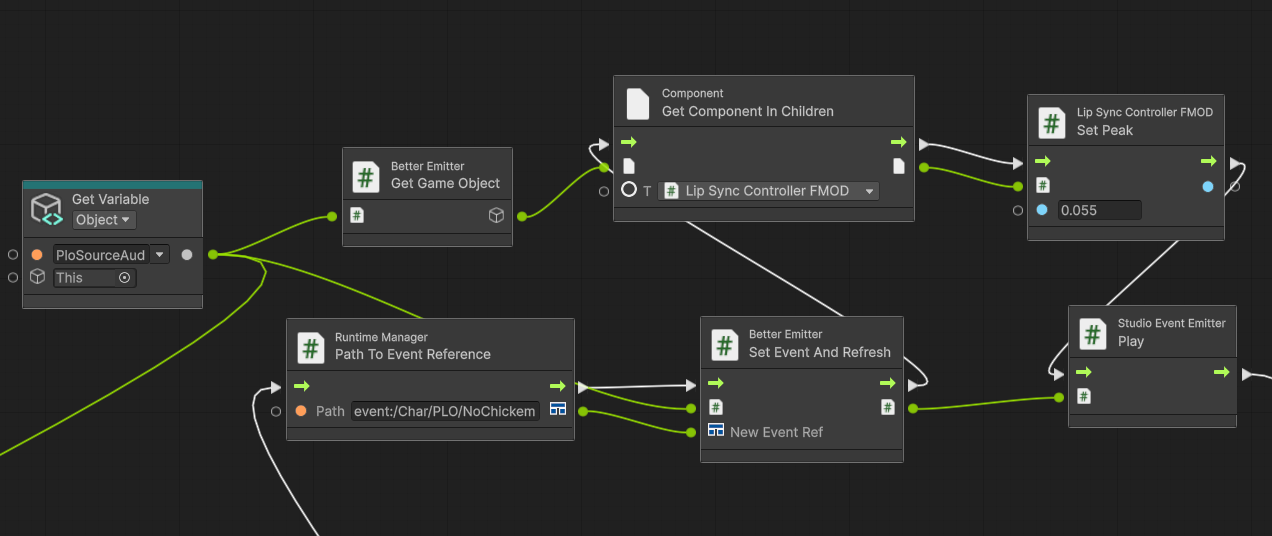
_Works exactly as intended_
👌