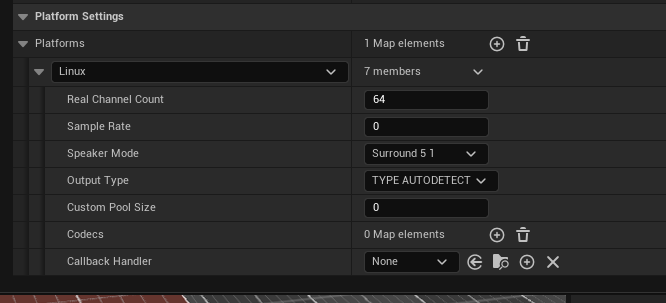
We are using FMOD 2.03.11 and UE 5.6 Unfortunately it seems the deck acts way differently than our PC builds. We just learned that the deck is Linux based. Do we need to build linux banks for it to work? Also when loading banks do we need to load each bank in Blueprints so for example each weapons bank needs to load the weapon bank for Linux, PS5 Xbox etc? We are mainly using blue prints so we need to know what we can do out of the box that won’t require too much coder intervention.
From what we were able to find this is some best practices according to AI. Speaker mode DSP if it means what I think it means can we still change between 5.1 and 7.1 in the deck? Currently our project does this. But it is done through busses so the bus before the master changes it from stereo to 5.1 etc.
even in FMOD I don’t see a linux based version so we are unsure of where to go from here.
Or do we add it in here in the unreal settings and it will just adjust the FMOD windows banks to work as intended?
Thank you!
-Rob
Hi,
We don’t specifically have a Linux platform, our Desktop platform covers some default settings for most operating systems. But it is possible to create multiple Desktop profiles and rename them accordingly:
FMOD Studio | Getting Events Into Your Game - Platform Settings
However, this is only required if you wish to apply different setting for Windows and Linux banks. If not you are fine to leave the banks in the Desktop platform profile.
This well depend on your integration settings:
Unreal Integration | Settings - Load All Banks
With the Load All Banks setting FMOD will load the correct banks on start up for your platform.
Correct, I believe it specifically referring to
speaker-mode-dependent DSP on the master bus
Can be ignore as FMOD will handle most up and down mixing. It may be referring to something like the FMOD Studio | Effect Reference - Channel Mix but that is still handled by FMOD anyway.
However, setting the FMOD output format can be set in the FMOD integration settings:
The Unreal Integration | Settings - Platform Settings reads your built banks to populate its list. Following the steps above we will be able to see our Linux platform profile here:

You would only need these settings if you want a different specific settings for Windows and Linux, otherwise the integration will just use the Basic output type.
If you are cross compiling for Linux (UE docs), make sure to have both the integrations:

Here I am adding the Linux integration on top of the Windows so that I can build for both platforms from my Windows Unreal project.
Could I please confirm:
-
Your FMOD version
-
Your Unreal Engine version
-
If you are packaging the Unreal build from a Windows or Linux PC?
Engine is 5.6.1
and we are packaging from a windows PC.
we found out that the problem is not only in the deck but happens more often in it. Our reverbs sound boomier in our build than our PIE. We are using convolution reverbs as well.
Our reverb systems are set up as several boxes within a big box 3 layers deep in Unreal. So if box B (building) is in A(outside). Box B would have a priority of 15 and box A would have 10. And box C (a room in said building) has a priority of 20. Box A is designed as a catch as well as trigger anything that the building needs upon entry. Our snap shots also reflect this. Where at the top would be
Building room
building
outside.
When we play in PIE this all seems to work and our first levels also seem to work just fine in our build. Unfortunatey our newer levels which were built on this system; it does not seem to work as it did before. Any thoughts? Did I set this up wrong? I was always under the impression higher prio in FMOD means it will override the one below (which all of the snapshots are overriding). Mixed with the higher prio in UE would be fine.
Thank you Cameron!
we are also using Atmoky as well

Thanks for the info.
Just to confirm, are you able to hear events on the steam deck now?
Would it be possible to connect to the PIE session with live update: Unreal Integration | Settings - Enable Live Update and record a profiler session: FMOD Studio | Profiling and upload the session with the following settings:
And then again in a development build of the game (there are no additional settings that need to be changed, just make sure it is a development build)?
What priority are you referencing here?
With the following settings:
Can you please share the full player logs when experiencing the issue?
Hopefully the profiler session and the logs will shed some light on what might be going on.
Hi,
Just following up if you were able to resolve the issue? If there is anything else we can assist with please do not hesitate to reach out!
Hey Connor!
We did! our winter break was a little long sorry! But I do now have a question about reverbs/snapshots. We found out that a snapshot that was set in an event in UE4 stayed on even between levels. I thought as soon as you would walk into another snapshot via a volume box that it would override the previous one? Or at the very least in between levels it would flush out the system.
Thanks
-Rob
Apologies for the delayed response, I hope you had a good break!
That depends on the FMOD Studio | Mixing - Priority. A snapshot is only overridden by higher priority ones.
How are you moving between levels? Unless the FMOD system is specifically told to shutdown it won’t flush out any active snapshots. Depending on how you are triggering the snapshots, it may be best to cache their instances to stop them on level changes. Groups of events can be stopped by calling: Unreal Integration | Blueprint Reference Bus - Bus Stop All Events. Unfortunately, this won’t work with snapshots