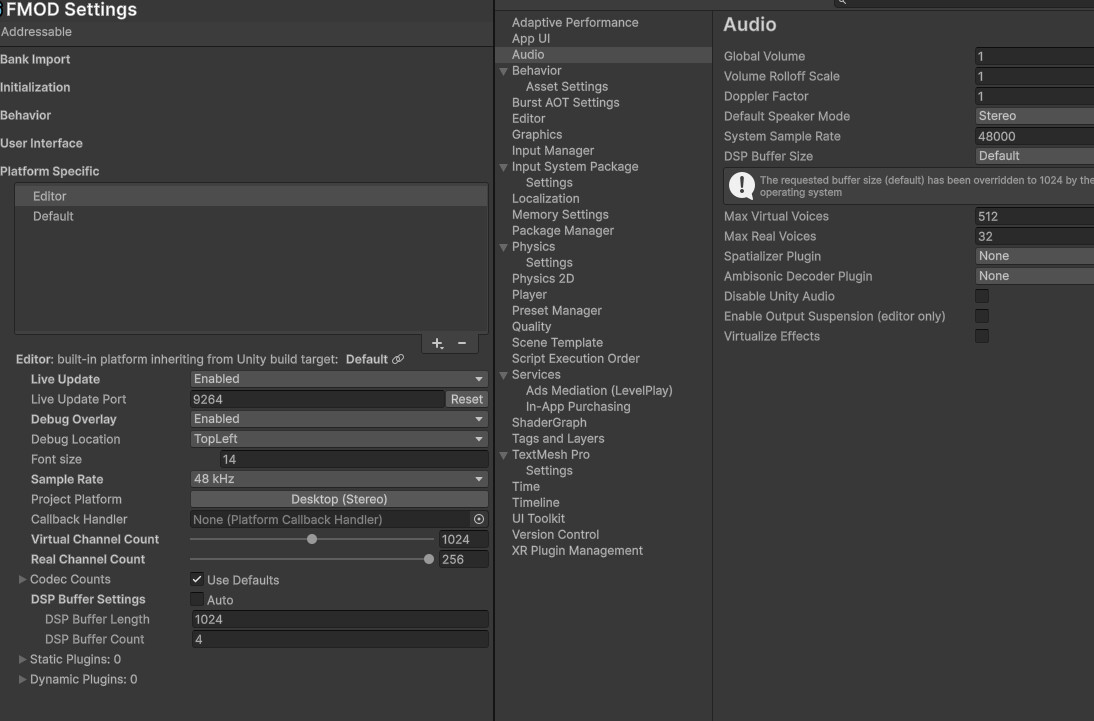
Here is an updated version that syncs with unity update and works well with variable/const framerate of Unity Recorder. One thing: you need to set Project Settings/Audio/Disable Unity Audio = false before entering playmode. Create GameObject with this component in runtime. Another catch is that might be crashes, relaunch Unity will help. This is the most stable what i managed to get.
Here is the script:
using System;
using System.Collections.Generic;
using System.Runtime.InteropServices;
using System.Threading;
using Sirenix.OdinInspector;
using UnityEngine;

namespace _Project.Recorder
{

    internal sealed class FmodAudioRecorderDSP : MonoBehaviour
    {
        [Title("Diagnostics")]
        [Tooltip("Print capture stats and mixer mode changes to the console. Errors are reported regardless")]
        [SerializeField] private bool showLogs;

        [Tooltip("Log a stats line every N seconds while capturing. 0 - only the final summary")]
        [SerializeField] [MinValue(0f)] [ShowIf(nameof(showLogs))] private float statsLogInterval = 5f;

        [Title("Non-realtime capture")]
        [Tooltip("Switch FMOD to NOSOUND_NRT and advance its mixer by hand, one video frame worth of audio per rendered frame. " +
                 "FMOD goes silent while this is on - that is the point of offline rendering")]
        [SerializeField] private bool driveMixerManually = true;

        [Tooltip("Stay this many audio frames ahead of the video timeline so Unity never pulls an empty queue")]
        [SerializeField] [MinValue(0)] private int aheadFrames = 1024;

        [Tooltip("Safety cap on CoreSystem.update() calls per rendered frame")]
        [SerializeField] [MinValue(1)] private int maxPumpsPerFrame = 64;

        private FMOD.DSP_READ_CALLBACK mReadCallback;
        private FMOD.DSP mCaptureDSP;
        private GCHandle mObjHandle;

        private int mFrontBufferPosition = 0;
        private readonly Queue<float[]> mFullBufferQueue = new();
        private readonly Queue<float[]> mEmptyBufferQueue = new();
        private readonly object lockOb = new();

        private static int nbChannelDetected = 0;

        // Stats counters. Written from the FMOD mixer thread and from Unity's audio thread,
        // read on the main thread - every access goes through Interlocked, and nothing here logs.
        private long mProducedFrames;
        private long mConsumedFrames;
        private long mDeliveredFrames;
        private long mFmodCallbacks;
        private long mFilterReads;

        // Main thread only.
        private int mSampleRate;
        private int mRenderedFrames;
        private int mCaptureFrames;
        private double mTimelineFrames;
        private float mRealStartTime;
        private float mNextStatsLogTime;

        // Manual mixer pumping, main thread only.
        private FMOD.OUTPUTTYPE mPreviousOutput;
        private bool mOutputSwitched;
        private long mPumpCalls;
        private int mPumpCapHits;

        // Start, not OnEnable: to buffer between object creation and dsp start
        private void Start()
        {
            StartDSP();
        }

        private void OnDisable()
        {
            StopDSP();
        }

        private void StartDSP()
        {
            ResetStats();

            var config = AudioSettings.GetConfiguration();
            int unitySampleRate = config.sampleRate;
            int unityChannels = config.speakerMode == AudioSpeakerMode.Stereo ? 2 : (int) config.speakerMode;
            int fmodSampleRate;

            FMOD.SPEAKERMODE fmodSpeakerMode;
            FMODUnity.RuntimeManager.CoreSystem.getSoftwareFormat(out fmodSampleRate, out fmodSpeakerMode, out _);

            int fmodChannels = fmodSpeakerMode == FMOD.SPEAKERMODE.STEREO ? 2 :
                fmodSpeakerMode == FMOD.SPEAKERMODE.MONO ? 1 :
                0; // Default to 0 for unsupported speaker modes(e.g. Surround)

            string unityFormat = unityChannels == 1 ? "Mono" :
                unityChannels == 2 ? "Stereo" : "Unsupported";

            string fmodFormat = fmodChannels == 1 ? "Mono" :
                fmodChannels == 2 ? "Stereo" : "Unsupported";

            if (fmodSampleRate != unitySampleRate || fmodChannels != unityChannels)
            {
                Debug.LogError($"FMOD/Unity audio mismatch or unsupported channel format. Unity: {unitySampleRate}Hz/{unityFormat}, FMOD: {fmodSampleRate}Hz/{fmodFormat}\n" +
                               $"Please ensure FMOD and Unity use the same sample rate and channel layout (Mono or Stereo only).");
                enabled = false;
                return;
            }

            mSampleRate = unitySampleRate;

            // Switch the output before the tap is attached: setOutput tears the output down and brings it back up.
            EnterNonRealtimeMode();

            mReadCallback = CaptureDSPReadCallback;
            mObjHandle = GCHandle.Alloc(this);
            var desc = new FMOD.DSP_DESCRIPTION
            {
                numinputbuffers = 1,
                numoutputbuffers = 1,
                read = mReadCallback,
                userdata = GCHandle.ToIntPtr(mObjHandle),
            };

            // Attach custom DSP to master channel group
            if (FMODUnity.RuntimeManager.CoreSystem.getMasterChannelGroup(out var masterCG) == FMOD.RESULT.OK)
            {
                if (FMODUnity.RuntimeManager.CoreSystem.createDSP(ref desc, out mCaptureDSP) == FMOD.RESULT.OK)
                {
                    if (masterCG.addDSP(FMOD.CHANNELCONTROL_DSP_INDEX.TAIL, mCaptureDSP) == FMOD.RESULT.OK)
                        // channelmask устарел, FMOD его игнорирует и пишет об этом в консоль
                        mCaptureDSP.setChannelFormat(0, 2, FMOD.SPEAKERMODE.STEREO);
                    else
                        Debug.LogWarning("FMOD: Failed to add DSP to master channel group.");
                }
                else
                {
                    Debug.LogWarning("FMOD: Failed to create DSP.");
                }
            }
            else
            {
                Debug.LogWarning("FMOD: Failed to retrieve master channel group.");
            }
        }

        private void StopDSP()
        {
            LogStats("final");

            // Detach first, free the handle second. A live DSP whose userdata points at a freed
            // GCHandle is a hard crash on the next mixer callback, so the tap must go down
            // even when the master channel group cannot be reached.
            if (mCaptureDSP.hasHandle())
            {
                if (FMODUnity.RuntimeManager.CoreSystem.getMasterChannelGroup(out var masterCG) == FMOD.RESULT.OK)
                    masterCG.removeDSP(mCaptureDSP);
                else
                    Debug.LogError("FMOD: master channel group is unreachable, releasing the capture DSP anyway.");

                mCaptureDSP.release();
                mCaptureDSP = default;
            }

            if (mObjHandle.IsAllocated) mObjHandle.Free();

            ExitNonRealtimeMode();

            lock (lockOb)
            {
                mFullBufferQueue.Clear();
                mEmptyBufferQueue.Clear();
            }
        }

        #region Manual mixer pumping

        private void EnterNonRealtimeMode()
        {
            if (!driveMixerManually) return;

            var core = FMODUnity.RuntimeManager.CoreSystem;

            var result = core.getOutput(out mPreviousOutput);
            if (result != FMOD.RESULT.OK)
            {
                Debug.LogError($"FMOD: getOutput failed ({result}). Staying realtime - capture will drift on constant frame rate.");
                return;
            }

            result = core.setOutput(FMOD.OUTPUTTYPE.NOSOUND_NRT);
            if (result != FMOD.RESULT.OK)
            {
                Debug.LogError($"FMOD: setOutput(NOSOUND_NRT) failed ({result}). Staying realtime - capture will drift on constant frame rate.");
                return;
            }

            mOutputSwitched = true;

            if (showLogs) Debug.Log($"FMOD: mixer is driven manually, output {mPreviousOutput} -> NOSOUND_NRT.");
        }

        private void ExitNonRealtimeMode()
        {
            if (!mOutputSwitched) return;

            mOutputSwitched = false;

            var result = FMODUnity.RuntimeManager.CoreSystem.setOutput(mPreviousOutput);
            if (result != FMOD.RESULT.OK)
            {
                Debug.LogError($"FMOD: failed to restore output {mPreviousOutput} ({result}). " +
                               "Sound will stay silent until Play Mode is restarted.");
                return;
            }

            if (showLogs) Debug.Log($"FMOD: mixer is back on its own clock, output NOSOUND_NRT -> {mPreviousOutput}.");
        }

        // Runs after game logic has posted this frame's events, so the mixer renders what the frame actually asked for.
        private void LateUpdate()
        {
            if (!mOutputSwitched) return;
            if (mSampleRate <= 0) return;

            long target = (long) mTimelineFrames + aheadFrames;
            var core = FMODUnity.RuntimeManager.CoreSystem;

            int pumps = 0;
            while (Interlocked.Read(ref mProducedFrames) < target && pumps < maxPumpsPerFrame)
            {
                if (core.update() != FMOD.RESULT.OK) break;
                pumps++;
            }

            mPumpCalls += pumps;

            if (pumps >= maxPumpsPerFrame) mPumpCapHits++;
        }

        #endregion

        private void OnAudioFilterRead(float[] data, int channels)
        {
            // Audio thread: count only, never log.
            Interlocked.Increment(ref mFilterReads);
            Interlocked.Add(ref mConsumedFrames, channels > 0 ? data.Length / channels : 0);

            // Avoid leftover noise
            Array.Clear(data, 0, data.Length);

            lock (lockOb)
            {
                int offset = 0;
                while (mFullBufferQueue.Count > 0 && offset < data.Length)
                {
                    float[] front = mFullBufferQueue.Peek();

                    int remainingInFront = front.Length - mFrontBufferPosition;

                    if (remainingInFront <= 0)
                    {
                        mFullBufferQueue.Dequeue();
                        mFrontBufferPosition = 0;
                        continue;
                    }

                    int remainingInData = data.Length - offset;

                    int copyLength = Math.Min(remainingInFront, remainingInData);
                    Array.Copy(front, mFrontBufferPosition, data, offset, copyLength);

                    mFrontBufferPosition += copyLength;
                    offset += copyLength;

                    // If buffer fully consumed, recycle it
                    if (mFrontBufferPosition < front.Length) continue;

                    mFullBufferQueue.Dequeue();
                    mFrontBufferPosition = 0;

                    // Recycle consumed buffers, limit to 32 stored
                    if (mEmptyBufferQueue.Count < 32) mEmptyBufferQueue.Enqueue(front);
                }

                Interlocked.Add(ref mDeliveredFrames, channels > 0 ? offset / channels : 0);
            }
        }

        [AOT.MonoPInvokeCallback(typeof(FMOD.DSP_READ_CALLBACK))]
        private static FMOD.RESULT CaptureDSPReadCallback(ref FMOD.DSP_STATE dsp_state, IntPtr inbuffer, IntPtr outbuffer, uint length, int inchannels, ref int outchannels)
        {
            IntPtr userData;

            dsp_state.functions.getuserdata(ref dsp_state, out userData);
            var objHandle = GCHandle.FromIntPtr(userData);
            var obj = objHandle.Target as FmodAudioRecorderDSP;
            if (inchannels > nbChannelDetected)
                nbChannelDetected = inchannels;
            if (inchannels > 2)
            {
                Debug.LogError("Channels FMOD > 2!");
                inchannels = 2;
            }

            // FMOD mixer thread: count only, never log.
            Interlocked.Increment(ref obj.mFmodCallbacks);
            Interlocked.Add(ref obj.mProducedFrames, length);

            int lengthElements = (int) length * inchannels;
            float[] buffer;

            // Try to reuse a managed buffer of the exact size to reduce GC pressure.
            lock (obj.lockOb)
            {
                if (obj.mEmptyBufferQueue.Count > 0)
                {
                    float[] tmp = obj.mEmptyBufferQueue.Dequeue();
                    buffer = tmp.Length == lengthElements ? tmp : new float[lengthElements];
                }
                else
                {
                    buffer = new float[lengthElements];
                }
            }

            Marshal.Copy(inbuffer, buffer, 0, lengthElements);

            lock (obj.lockOb)
            {
                obj.mFullBufferQueue.Enqueue(buffer);
            }

            // Pass through to FMOD downstream (so monitoring still works)
            Marshal.Copy(buffer, 0, outbuffer, lengthElements);
            outchannels = inchannels;
            return FMOD.RESULT.OK;
        }

        #region Stats

        private void Update()
        {
            mRenderedFrames++;

            // The video timeline: a rendered frame is worth exactly one frame delta of audio.
            float delta = Time.captureDeltaTime;
            if (delta > 0f) mCaptureFrames++;
            else delta = Time.unscaledDeltaTime;

            mTimelineFrames += (double) delta * mSampleRate;

            if (statsLogInterval <= 0f) return;
            if (Time.realtimeSinceStartup < mNextStatsLogTime) return;

            mNextStatsLogTime = Time.realtimeSinceStartup + statsLogInterval;
            LogStats("progress");
        }

        // Explicit request, so it prints even with showLogs off.
        [Button("Log stats now")]
        private void LogStatsNow()
        {
            LogStats("manual", force: true);
        }

        private void ResetStats()
        {
            Interlocked.Exchange(ref mProducedFrames, 0L);
            Interlocked.Exchange(ref mConsumedFrames, 0L);
            Interlocked.Exchange(ref mDeliveredFrames, 0L);
            Interlocked.Exchange(ref mFmodCallbacks, 0L);
            Interlocked.Exchange(ref mFilterReads, 0L);

            mRenderedFrames = 0;
            mCaptureFrames = 0;
            mTimelineFrames = 0d;
            mPumpCalls = 0L;
            mPumpCapHits = 0;
            mRealStartTime = Time.realtimeSinceStartup;
            mNextStatsLogTime = Time.realtimeSinceStartup + statsLogInterval;
        }

        // Main thread only - the mixer and audio threads never log, they only bump counters.
        private void LogStats(string title, bool force = false)
        {
            if (!showLogs && !force) return;
            if (Interlocked.Read(ref mFmodCallbacks) == 0L && Interlocked.Read(ref mFilterReads) == 0L) return;

            Debug.Log(BuildStatsReport(title));
        }

        private string BuildStatsReport(string title)
        {
            long produced = Interlocked.Read(ref mProducedFrames);
            long consumed = Interlocked.Read(ref mConsumedFrames);
            long delivered = Interlocked.Read(ref mDeliveredFrames);
            long fmodCallbacks = Interlocked.Read(ref mFmodCallbacks);
            long filterReads = Interlocked.Read(ref mFilterReads);

            long expected = (long) mTimelineFrames;
            float timelineElapsed = FramesToSeconds(expected);
            float realElapsed = Time.realtimeSinceStartup - mRealStartTime;
            float clockRatio = timelineElapsed > 0f ? realElapsed / timelineElapsed : 0f;

            float captureDelta = Time.captureDeltaTime;
            string frameRateMode = captureDelta > 0f ? $"{1f / captureDelta:F1} fps, constant" : "variable frame rate";
            string mixerMode = mOutputSwitched ? "NOSOUND_NRT, driven by hand" : "realtime, own clock";

            int queuedBuffers;
            lock (lockOb) queuedBuffers = mFullBufferQueue.Count;

            return $"[FmodAudioRecorderDSP] stats ({title})\n" +
                   $"  render    : {mRenderedFrames} frames ({mCaptureFrames} captured), captureDeltaTime {captureDelta:F5}s ({frameRateMode})\n" +
                   $"  clock     : timeline {timelineElapsed:F2}s, real {realElapsed:F2}s, real/timeline {clockRatio:F2}\n" +
                   $"  mixer     : {mixerMode}, {mPumpCalls} pumps, {PumpsPerFrame():F2} per rendered frame, cap hits {mPumpCapHits}\n" +
                   $"  produced  : {produced} frames / {FramesToSeconds(produced):F2}s (FMOD mixer, {fmodCallbacks} callbacks)\n" +
                   $"  consumed  : {consumed} frames / {FramesToSeconds(consumed):F2}s (Unity pulled, {filterReads} reads)\n" +
                   $"  delivered : {delivered} frames / {FramesToSeconds(delivered):F2}s, underrun {consumed - delivered} frames\n" +
                   $"  expected  : {expected} frames / {timelineElapsed:F2}s (video timeline x {mSampleRate}Hz)\n" +
                   $"  drift     : produced-expected {produced - expected} frames / {FramesToSeconds(produced - expected):F2}s\n" +
                   $"  backlog   : {produced - delivered} frames / {FramesToSeconds(produced - delivered):F2}s, queue {queuedBuffers} buffers";
        }

        private float FramesToSeconds(long frames)
        {
            return mSampleRate > 0 ? frames / (float) mSampleRate : 0f;
        }

        private float PumpsPerFrame()
        {
            return mRenderedFrames > 0 ? mPumpCalls / (float) mRenderedFrames : 0f;
        }

        #endregion
    }

}