I’m trying to trigger the local labelled parameter Ball Weight to change which Ball Destroy sfx to play per instance of ball.
Here’s the prefabs:
In the following FSM, the Weight variable is retrieved in Get Parent Ball and set as the variable BallWeight within the FSM.
With String Compare, I check value of BallWeight and send it to the corresponding state, which then sets the parameter integer value as ParameterValue.
Finally, I use the ParamaterValue to set the local Ball Weight parameter with a custom script, then call Play() on the attached emitter.
Here’s the script:
using UnityEngine;
using HutongGames.PlayMaker;
using FMODUnity;
using FMOD.Studio;

namespace HutongGames.PlayMaker.Actions
{
    [ActionCategory("FMOD")]
    [Tooltip("Sets a local FMOD parameter on a Studio Event Emitter using an FsmVar.")]
    public class SetLocalFMODParameter : FsmStateAction
    {
        [RequiredField]
        [Tooltip("GameObject containing the FMOD Studio Event Emitter.")]
        public FsmOwnerDefault gameObject;

        [RequiredField]
        [Tooltip("Name of the FMOD parameter.")]
        public FsmString parameterName;

        [RequiredField]
        [Tooltip("Value to set (Float, Int, or String for labeled parameters).")]
        public FsmVar parameterValue;

        [Tooltip("Repeat every frame.")]
        public bool everyFrame;

        private StudioEventEmitter emitter;
        private EventInstance eventInstance;

        public override void Reset()
        {
            gameObject = null;
            parameterName = "";
            parameterValue = new FsmVar();
            everyFrame = false;
        }

        public override void OnEnter()
        {
            DoSetParameter();

            if (!everyFrame)
                Finish();
        }

        public override void OnUpdate()
        {
            DoSetParameter();
        }

        void DoSetParameter()
        {
            GameObject go = Fsm.GetOwnerDefaultTarget(gameObject);
            if (go == null)
                return;

            if (emitter == null)
                emitter = go.GetComponent<StudioEventEmitter>();
            if (emitter == null)
                return;

            eventInstance = emitter.EventInstance;

            switch (parameterValue.Type)
            {
                case VariableType.Float:
                    eventInstance.setParameterByName(
                        parameterName.Value,
                        parameterValue.floatValue
                    );
                    break;

                case VariableType.Int:
                    eventInstance.setParameterByName(
                        parameterName.Value,
                        parameterValue.intValue
                    );
                    break;

                case VariableType.String:
                    eventInstance.setParameterByNameWithLabel(
                        parameterName.Value,
                        parameterValue.stringValue
                    );
                    break;
            }
        }
    }
}
I’m aware local parameters can’t be updated before the instance is created, and I‘ve tried triggering Play() and then setting the parameter (with and without a frame delay) but with no luck.
Oh, and for the purposes of testing I’m hard coding the values. Once it’s working, I’ll dynamically set the parameter by the label name. This was my initial setup which didn’t work, so I changed it to use the integer values instead in hopes this would solve the issue.
Interestingly, this setup occasionally works. It seems to work when balls destroy in rapid succession, so I suspect it’s because the instances were already playing when the parameter updates.
Hi,
Thanks for the images and information.
Unfortunately, we do not have access to Play Maker plugin.
Could I please grab your Unity and FMOD integration versions?
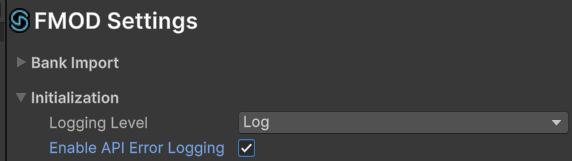
With the following settings enabled:
Are there any FMOD errors in the console?
Most FMOD functions return FMOD Engine | Core Api Common - Fmod::Result, are you able to log those through Play Maker? In your DoSetParameter() can we add FMOD.RESULT result = eventInstance.SetParameterByName()and log the results of those calls too?
No worries. The same logic should still apply.
Here’s some errors from FMOD. The Button Status and Null Reference errors aren’t relevant.
I’m not sure exactly what you mean by eventInstance. It’s not a variable I have in my script, and I don’t know exactly how to set that up. I added a log to see if the correct label was sent:
void DoSetParameter()

        {

GameObject go = Fsm.GetOwnerDefaultTarget(gameObject);

if (go == null)

return;


if (emitter == null)

emitter = go.GetComponent<StudioEventEmitter>();


if (emitter == null)

return;


switch (parameterValue.Type)

            {

case VariableType.Float:

emitter.SetParameter(

parameterName.Value,

parameterValue.floatValue

                    );

break;


case VariableType.Int:

emitter.SetParameter(

parameterName.Value,

parameterValue.intValue

                    );

break;


case VariableType.String:

if (string.IsNullOrEmpty(parameterValue.stringValue))

return;


if (!emitter.IsPlaying())

emitter.Play();


var instance = emitter.EventInstance;

if (!instance.isValid())

return;


UnityEngine.Debug.Log($"FMOD Label → Param: '{parameterName.Value}', Label: '{parameterValue.stringValue}'");


instance.setParameterByNameWithLabel(

parameterName.Value,

parameterValue.stringValue

                    );

break;


            }
Each ball’s weight is initially an empty string when the ball is enabled (they’re initially pooled and then disabled), so I added a condition for this. Now, they correctly send the corresponding weight though only sometimes plays the correct sound. Even more interestingly, when the correct sound does play it also plays the default sound (Medium).
UPDATE:
I changed the starting ball weight from Medium to Extra Light to see if I could find out why it only works sometimes. Strangely, it plays the Medium sfx by default and switches to the Extra Light sfx immediately after clicking on the Ball instance and opening the BallCollisionSFX FSM. Tested this multiple times, worked every time, and only when opening BallCollisionSFX. I’m stumped.
Thank you for the logs.
The FMOD_ERR_EVENT_NOTFOUND could be telling us there is an issue with the event instance we are interacting with.
The FMOD Studio | Glossary - Event Instance is an instance of our FMOD Studio event that is mostly likely being created by our Unity Integration | Game Components - Studio Event Emitter.
Here we are getting a reference to the instance attached to our emitter
emitter = go.GetComponent<StudioEventEmitter>();
eventInstance = emitter.EventInstance;
Then setting the parameter attached to our event instance:
eventInstance.setParameterByName(
    parameterName.Value,
    parameterValue.floatValue
);
Some additional checks we could add are:
if (eventInstance.isValid())
Could I please get a screenshot of your event emitter in Unity:
I am thinking there may be an issue with our emitter.
I see, thanks for clarifying. Here’s the emitter:
Since the FSM handles the emitter triggering, it’s best to keep them as None here. They both trigger fine, the parameter just doesn’t update.
I updated my code as suggested, though Unity can’t find SetParameterByName on eventInstance. I’m using version 2.02.30.
void DoSetParameter()

        {

GameObject go = Fsm.GetOwnerDefaultTarget(gameObject);

emitter = go.GetComponent<StudioEventEmitter>();

EventInstance eventInstance = emitter.EventInstance;


if (go == null || emitter == null || !eventInstance.isValid())

return;


switch (parameterValue.Type)

            {

case VariableType.Float:

eventInstance.SetParameterByName(

parameterName.Value,

parameterValue.floatValue

                    );

break;


case VariableType.Int:

eventInstance.SetParameterByName(

parameterName.Value,

parameterValue.intValue

                    );

break;


case VariableType.String:

eventInstance.setParameterByNameWithLabel(

parameterName.Value,

parameterValue.stringValue

                    );

break;

            }

        }
Current version:
UPDATE 1:
I updated FMOD and FMOD Studio as I didn’t realise there was a new version available. After importing the updated files, I get this error:

I’ve also migrated the FMOD Studio project and rebuilt the banks. The Unity editor version is 6000.0.62f1. The line of code where the error originates from is public FMOD.DSP_FFT_WINDOW windowType = FMOD.DSP_FFT_WINDOW.HANNING
UPDATE 2:
Seems like the syntax has changed to DSP_FTT_WINDOW_TYPE, though now Unity can’t find FMOD.DSP_FTT.WINDOWTYPEin _fft.setParameterInt((int)FMOD.DSP_FFT.WINDOWTYPE, (int)windowType);.
UPDATE 3:
Fixed the above issue, just incorrect syntax. Same with the FMOD Unity error; was incorrectly using SetParamaterByName instead of setParameterByName. I’ve updated the script to check if the eventInstance is valid, which it’s not.

FMOD.RESULT logs this:

UPDATE 4:
I can confirm opening the FSM window somehow allows the parameter to trigger correctly. FMOD.RESULT is logged where the labelled parameter is set, returning ERR_EVENT_NOTFOUND until the FSM window is opened, where it returns OK.
Thank you for the info! Good to hear you were able to work through those issues.
Just to make sure I understand, with the FSM window open it updates the parameter as expected? With the window closed you receive the error ERR_EVENT_NOTFOUND?
Would it be possible to share a stripped down version of the project with the issue or possible to make a test project that has the issue that I could test on my side? It can be uploaded to your profile.
Thank you!