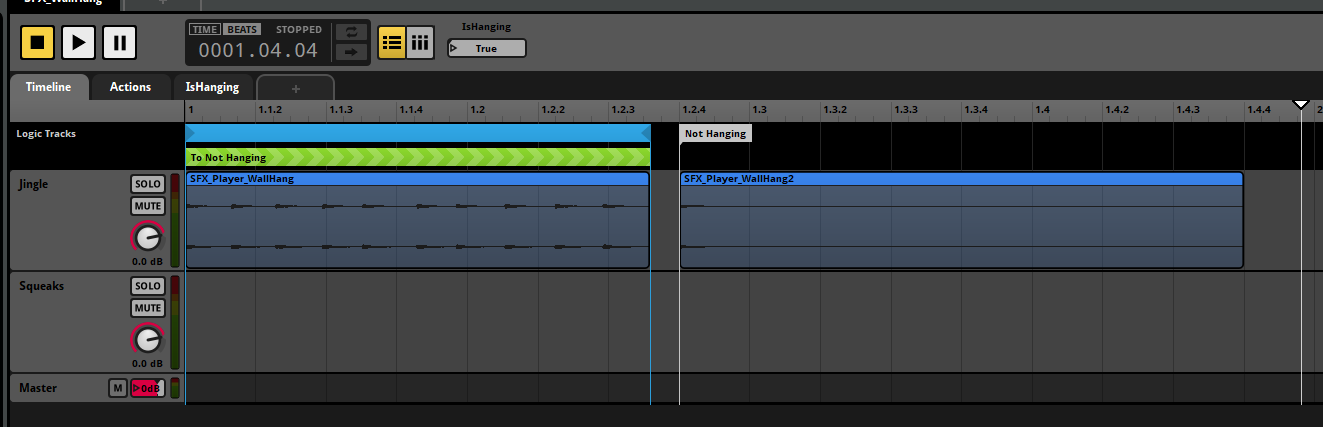
Hi peeps, I’m pretty much a beginner at using FMOD, as well as Unreal Engine. So sorry if I do not have the terminology or if anything I’m saying is unclear. I have a sound effect that plays when our character hangs from a ledge.
I can get the event to play, however I’m struggling to stop the event once you let go. I’ve tried going into the ledge BP, tried an AnimNotify and an AnimNotifyState but I can’t seem to figure it out. I think what is probably causing the challenge is not understanding how to make Unreal modify the parameters I have set in FMOD. If anyone has any advice I would be truly grateful!
I attached a screenshot of the way FMOD is set up. I would post the Blueprints I have, but honestly it’s a mess and I would imagine I’m doing things all wrong just because I’m a newbie. Trying to use Google to find answers / research this has not been helpful, hence why I’m posting here.
Hi!
The general intention with playing FMOD events using AnimNotifies is that the events will be one-shots. If they’re not, as you’ve noticed, they’ll continue to play indefinitely, and since the AnimNotify doesn’t expose an event instance handle, it’s not possible to stop the instance or set a parameter that would cause it to stop.
If you’d prefer to keep the event as is, you’d need to start your event instance alongside the animation, and then set the IsHanging parameter to false when the player exits the animation.
If instead you want to make use of AnimNotifies, I would recommend setting up your wall hang event so that it’s a one-shot event that uses an action sheet or a multi instrument to pick randomly from a list of sounds (i.e. the SFX_Player_WallHang audio cut into individual clips). You can then use AnimNotifies to trigger an instance of the event at the intended interval of the animation.