I’m working with a musician to develop adaptive music for my game. The adaptive music is very simple – when a certain variable is assigned to true, play one song, when it’s false, play another song instead (continuing where you left off).
As a hack, I’d like them to be able to drop their songs into a folder while prototyping to experiment with different soundtracks. This seems easier than asking them to learn to make fmod banks (and asking myself to learn to load user generated banks…).
However, the resources I’ve found only cover how to create and play events that contain exactly one Programmer Instrument.
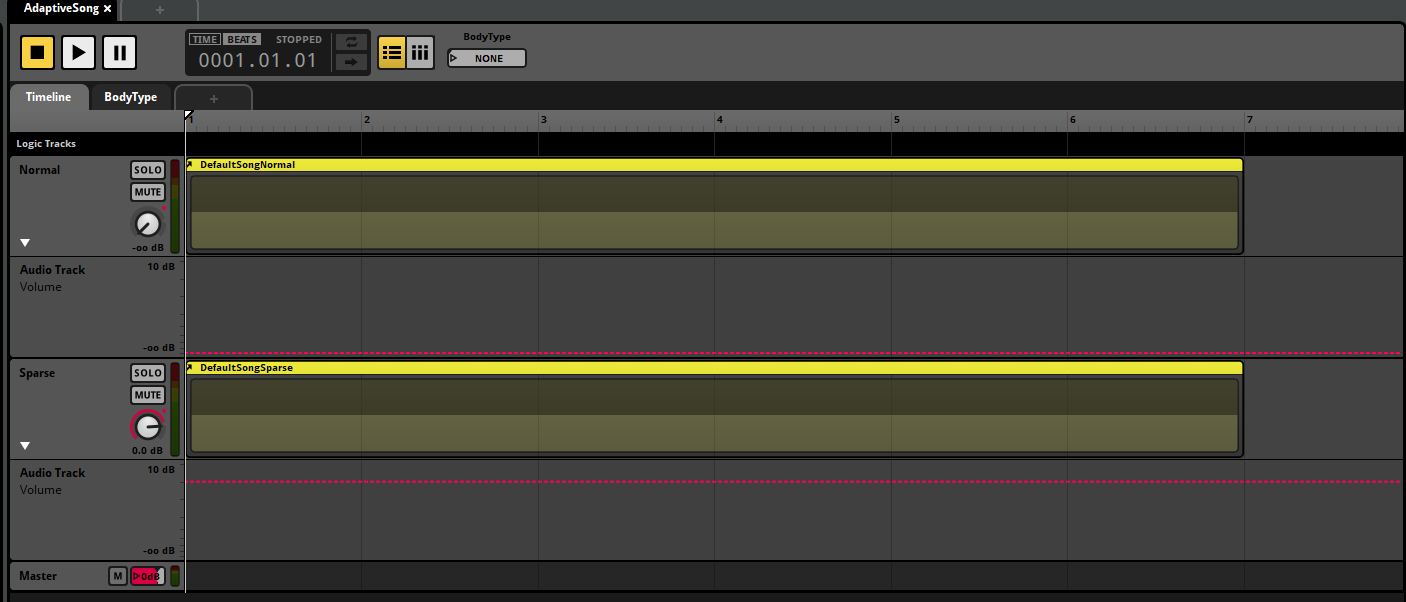
My current attempt is pictured below – I reference the Programmer Instruments in another event, and I shift the volume depending on a variable. It works great on the example, but it doesn’t work in real life (because I have no way of telling fmod what to load for each programmer instrument without playing the programmer instruments).
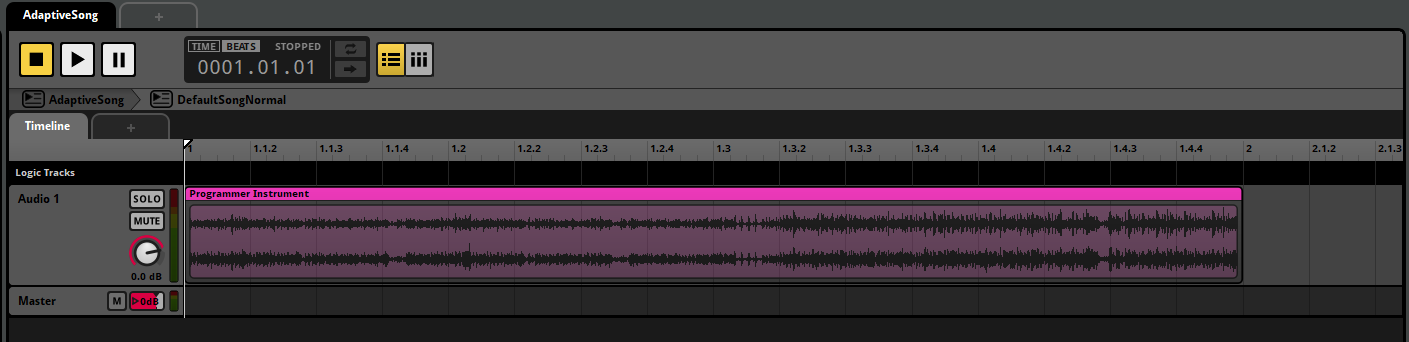
This is what one of the nested events in the main event looks like^
I think I could just make two separate programming instruments and make each of them depend on the variable (this is okay to be hacky after all), but I worry that they’d get out of sync.
Where the fader of each audio track is controlled via a parameter.
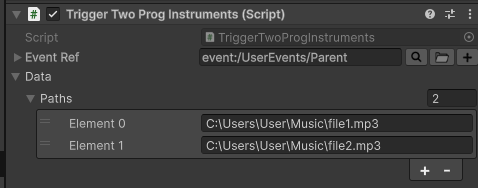
I then use the following script to play and assigned the audio files for both the programmer instruments:
using System;
using System.Collections.Generic;
using System.Runtime.InteropServices;
using UnityEngine;
using UnityEngine.InputSystem;

[Serializable]
public class EventData
{
    // Paths of the audio files on disk to be played
    public List<string> paths = new List<string>();

    // Used increment the file paths used when triggering the programmer instruments
    private int currentProgInstrument = 0;
    public int CurrentProgInstrument
    {
        get
        {
            return currentProgInstrument;
        }
        set
        {
            currentProgInstrument = value;
        }
    }
}

public class TriggerTwoProgInstruments : MonoBehaviour
{
    public FMODUnity.EventReference eventRef;
    private FMOD.Studio.EventInstance eventInst;

    public EventData data = new EventData();

    void Start()
    {
        // Create our event instance
        eventInst = FMODUnity.RuntimeManager.CreateInstance(eventRef);

        // Set our callback that will only trigger when the programmer instruments are created and destroyed
        eventInst.setCallback(EventCallback, FMOD.Studio.EVENT_CALLBACK_TYPE.CREATE_PROGRAMMER_SOUND | FMOD.Studio.EVENT_CALLBACK_TYPE.DESTROY_PROGRAMMER_SOUND);

        // Convert our EventData to an IntPtr so it can be passed to our event instance
        GCHandle handle = GCHandle.Alloc(data);
        eventInst.setUserData(GCHandle.ToIntPtr(handle));

        // Start our instance
        eventInst.start();
    }

    [AOT.MonoPInvokeCallback(typeof(FMOD.Studio.EVENT_CALLBACK))]
    static FMOD.RESULT EventCallback(FMOD.Studio.EVENT_CALLBACK_TYPE type, IntPtr instancePtr, IntPtr parameterPtr)
    {
        FMOD.Studio.EventInstance instance = new FMOD.Studio.EventInstance(instancePtr);

        // Retrieve the user data
        IntPtr dataPtr;
        instance.getUserData(out dataPtr);

        // Get the data from our pointer
        GCHandle dataHandle = GCHandle.FromIntPtr(dataPtr);
        EventData data = dataHandle.Target as EventData;

        switch (type)
        {
            case FMOD.Studio.EVENT_CALLBACK_TYPE.CREATE_PROGRAMMER_SOUND:
            {
                FMOD.MODE soundMode = FMOD.MODE.LOOP_NORMAL | FMOD.MODE.CREATECOMPRESSEDSAMPLE | FMOD.MODE.NONBLOCKING;
                var parameter = (FMOD.Studio.PROGRAMMER_SOUND_PROPERTIES)Marshal.PtrToStructure(parameterPtr, typeof(FMOD.Studio.PROGRAMMER_SOUND_PROPERTIES));

                FMOD.Sound sound;
                // We will use the `CurrentProgInstrument` to retrieve the audio files paths from our list
                var soundResult = FMODUnity.RuntimeManager.CoreSystem.createSound(data.paths[data.CurrentProgInstrument], soundMode, out sound);
                if (soundResult == FMOD.RESULT.OK)
                {
                    parameter.sound = sound.handle;
                    parameter.subsoundIndex = -1;
                    Marshal.StructureToPtr(parameter, parameterPtr, false);
                }

                // Increment the index to use the next audio file path
                data.CurrentProgInstrument++;

                break;
            }
            case FMOD.Studio.EVENT_CALLBACK_TYPE.DESTROY_PROGRAMMER_SOUND:
            {
                var parameter = (FMOD.Studio.PROGRAMMER_SOUND_PROPERTIES)Marshal.PtrToStructure(parameterPtr, typeof(FMOD.Studio.PROGRAMMER_SOUND_PROPERTIES));
                var sound = new FMOD.Sound(parameter.sound);
                sound.release();

                break;
            }
            case FMOD.Studio.EVENT_CALLBACK_TYPE.DESTROYED:
            {
                // Now the event has been destroyed, unpin the string memory so it can be garbage collected
                dataHandle.Free();

                break;
            }
        }
        return FMOD.RESULT.OK;
    }
}
This worked perfectly! Here is the final script I ended up with – there is one change to toggle the sound manually and one change to read from StreamingAssets:
using System;
using System.Collections.Generic;
using System.Runtime.InteropServices;
using UnityEngine;
using UnityEngine.InputSystem;

[Serializable]
public class EventData
{
    // Paths of the audio files on disk to be played
    public List<string> paths = new List<string>();

    // Used increment the file paths used when triggering the programmer instruments
    private int currentProgInstrument = 0;
    public int CurrentProgInstrument
    {
        get { return currentProgInstrument; }
        set { currentProgInstrument = value; }
    }
}

public class TriggerTwoProgInstruments : MonoBehaviour
{
    [SerializeField]
    private InputActionReference FirstInstrument;

    [SerializeField]
    private InputActionReference SecondInstrument;

    public FMODUnity.EventReference eventRef;
    private FMOD.Studio.EventInstance eventInst;

    public EventData data = new EventData();

    void Update()
    {
        if (FirstInstrument.action.triggered)
        {
            eventInst.setParameterByNameWithLabel("BodyState", "NO_BODY");
        }
        if (SecondInstrument.action.triggered)
        {
            eventInst.setParameterByNameWithLabel("BodyState", "IN_BODY");
        }
    }

    void Start()
    {
        Debug.Log("Yup!");
        // Create our event instance
        eventInst = FMODUnity.RuntimeManager.CreateInstance(eventRef);

        // Set our callback that will only trigger when the programmer instruments are created and destroyed
        eventInst.setCallback(
            EventCallback,
            FMOD.Studio.EVENT_CALLBACK_TYPE.CREATE_PROGRAMMER_SOUND
                | FMOD.Studio.EVENT_CALLBACK_TYPE.DESTROY_PROGRAMMER_SOUND
        );

        // Convert our EventData to an IntPtr so it can be passed to our event instance
        GCHandle handle = GCHandle.Alloc(data);
        eventInst.setUserData(GCHandle.ToIntPtr(handle));

        // Start our instance
        eventInst.start();
    }

    [AOT.MonoPInvokeCallback(typeof(FMOD.Studio.EVENT_CALLBACK))]
    static FMOD.RESULT EventCallback(
        FMOD.Studio.EVENT_CALLBACK_TYPE type,
        IntPtr instancePtr,
        IntPtr parameterPtr
    )
    {
        FMOD.Studio.EventInstance instance = new FMOD.Studio.EventInstance(instancePtr);

        // Retrieve the user data
        IntPtr dataPtr;
        instance.getUserData(out dataPtr);

        // Get the data from our pointer
        GCHandle dataHandle = GCHandle.FromIntPtr(dataPtr);
        EventData data = dataHandle.Target as EventData;

        switch (type)
        {
            case FMOD.Studio.EVENT_CALLBACK_TYPE.CREATE_PROGRAMMER_SOUND:
            {
                FMOD.MODE soundMode =
                    FMOD.MODE.LOOP_NORMAL
                    | FMOD.MODE.CREATECOMPRESSEDSAMPLE
                    | FMOD.MODE.NONBLOCKING;
                var parameter = (FMOD.Studio.PROGRAMMER_SOUND_PROPERTIES)
                    Marshal.PtrToStructure(
                        parameterPtr,
                        typeof(FMOD.Studio.PROGRAMMER_SOUND_PROPERTIES)
                    );

                FMOD.Sound sound;
                // We will use the `CurrentProgInstrument` to retrieve the audio files paths from our list
                // Audio files I'm interested in live under the streaming assets path
                var soundResult = FMODUnity.RuntimeManager.CoreSystem.createSound(
                    Application.streamingAssetsPath + "/" + data.paths[data.CurrentProgInstrument],
                    soundMode,
                    out sound
                );
                if (soundResult == FMOD.RESULT.OK)
                {
                    parameter.sound = sound.handle;
                    parameter.subsoundIndex = -1;
                    Marshal.StructureToPtr(parameter, parameterPtr, false);
                }

                // Increment the index to use the next audio file path
                data.CurrentProgInstrument++;

                break;
            }
            case FMOD.Studio.EVENT_CALLBACK_TYPE.DESTROY_PROGRAMMER_SOUND:
            {
                var parameter = (FMOD.Studio.PROGRAMMER_SOUND_PROPERTIES)
                    Marshal.PtrToStructure(
                        parameterPtr,
                        typeof(FMOD.Studio.PROGRAMMER_SOUND_PROPERTIES)
                    );
                var sound = new FMOD.Sound(parameter.sound);
                sound.release();

                break;
            }
            case FMOD.Studio.EVENT_CALLBACK_TYPE.DESTROYED:
            {
                // Now the event has been destroyed, unpin the string memory so it can be garbage collected
                dataHandle.Free();

                break;
            }
        }
        return FMOD.RESULT.OK;
    }
}
This should make it much easier for the musician and I to tell what the music would be like in game. Thank you so much!