Hi,
Thanks for the photos.
This is definitely possible! I have slightly modified our scripting example: Unity Integration | Examples Programmer Sounds. When we assign the event callback (FMOD Engine | Studio Api Eventinstance - Fmod::Studio::Event::Callback::Type) CREATE_PROGRAMMER_SOUND this will trigger both times the programmer instruments are played. I made an event similar to yours:

Where the fader of each audio track is controlled via a parameter.
I then use the following script to play and assigned the audio files for both the programmer instruments:
using System;
using System.Collections.Generic;
using System.Runtime.InteropServices;
using UnityEngine;
using UnityEngine.InputSystem;

[Serializable]
public class EventData
{
    // Paths of the audio files on disk to be played
    public List<string> paths = new List<string>();

    // Used increment the file paths used when triggering the programmer instruments
    private int currentProgInstrument = 0;
    public int CurrentProgInstrument
    {
        get
        {
            return currentProgInstrument;
        }
        set
        {
            currentProgInstrument = value;
        }
    }
}

public class TriggerTwoProgInstruments : MonoBehaviour
{
    public FMODUnity.EventReference eventRef;
    private FMOD.Studio.EventInstance eventInst;

    public EventData data = new EventData();

    void Start()
    {
        // Create our event instance
        eventInst = FMODUnity.RuntimeManager.CreateInstance(eventRef);

        // Set our callback that will only trigger when the programmer instruments are created and destroyed
        eventInst.setCallback(EventCallback, FMOD.Studio.EVENT_CALLBACK_TYPE.CREATE_PROGRAMMER_SOUND | FMOD.Studio.EVENT_CALLBACK_TYPE.DESTROY_PROGRAMMER_SOUND);

        // Convert our EventData to an IntPtr so it can be passed to our event instance
        GCHandle handle = GCHandle.Alloc(data);
        eventInst.setUserData(GCHandle.ToIntPtr(handle));

        // Start our instance
        eventInst.start();
    }

    [AOT.MonoPInvokeCallback(typeof(FMOD.Studio.EVENT_CALLBACK))]
    static FMOD.RESULT EventCallback(FMOD.Studio.EVENT_CALLBACK_TYPE type, IntPtr instancePtr, IntPtr parameterPtr)
    {
        FMOD.Studio.EventInstance instance = new FMOD.Studio.EventInstance(instancePtr);

        // Retrieve the user data
        IntPtr dataPtr;
        instance.getUserData(out dataPtr);

        // Get the data from our pointer
        GCHandle dataHandle = GCHandle.FromIntPtr(dataPtr);
        EventData data = dataHandle.Target as EventData;

        switch (type)
        {
            case FMOD.Studio.EVENT_CALLBACK_TYPE.CREATE_PROGRAMMER_SOUND:
            {
                FMOD.MODE soundMode = FMOD.MODE.LOOP_NORMAL | FMOD.MODE.CREATECOMPRESSEDSAMPLE | FMOD.MODE.NONBLOCKING;
                var parameter = (FMOD.Studio.PROGRAMMER_SOUND_PROPERTIES)Marshal.PtrToStructure(parameterPtr, typeof(FMOD.Studio.PROGRAMMER_SOUND_PROPERTIES));

                FMOD.Sound sound;
                // We will use the `CurrentProgInstrument` to retrieve the audio files paths from our list
                var soundResult = FMODUnity.RuntimeManager.CoreSystem.createSound(data.paths[data.CurrentProgInstrument], soundMode, out sound);
                if (soundResult == FMOD.RESULT.OK)
                {
                    parameter.sound = sound.handle;
                    parameter.subsoundIndex = -1;
                    Marshal.StructureToPtr(parameter, parameterPtr, false);
                }

                // Increment the index to use the next audio file path
                data.CurrentProgInstrument++;

                break;
            }
            case FMOD.Studio.EVENT_CALLBACK_TYPE.DESTROY_PROGRAMMER_SOUND:
            {
                var parameter = (FMOD.Studio.PROGRAMMER_SOUND_PROPERTIES)Marshal.PtrToStructure(parameterPtr, typeof(FMOD.Studio.PROGRAMMER_SOUND_PROPERTIES));
                var sound = new FMOD.Sound(parameter.sound);
                sound.release();

                break;
            }
            case FMOD.Studio.EVENT_CALLBACK_TYPE.DESTROYED:
            {
                // Now the event has been destroyed, unpin the string memory so it can be garbage collected
                dataHandle.Free();

                break;
            }
        }
        return FMOD.RESULT.OK;
    }
}
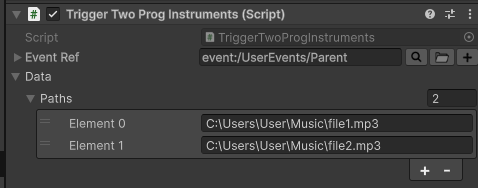
I haven’t implemented a way to set the parameter value but that is easily done with: FMOD Engine | Studio Api Eventinstance - Studio::Eventinstance::Setparameterbyname.
Please note, this script should only be used for testing.
Hope this helps!