I work in a game studio and I don’t get access to our in-house game engine or code, so I try to do as much as I can in FMOD so as to make everything as easy as possible for the programmers who are usually swamped.
I want to be able to have the programmers call event and set parameters A, B, C etc to their respective values, and then use one parameter to affect volume levels.
So at a given point in the timeline, I want to say “now master parameter is equal to parameter B… now it’s equal to parameter C, etc.”
The only way I’ve found to do this is to have a command instrument for every single possible value, ie, if Parameter A, Value 1, then Master parameter set to value 1, etc.
It’s clunky. And gets worse the more values you add.
It would be really nice if I could treat one parameter as a variable. Is this possible?
have you tried to “add automation” to whatever parameter you want to be in charge from the parameter browser window ?
Then choose another parameter that will pilot your values.
You were right to use command instruments. You don’t need to have a separate command instrument for every possible value, though. Instead, you need one command instrument for parameter A, one for parameter B, one of parameter C - one command instrument for each parameter whose value you want to be able to use to control the volume, in other words. Automate the value of the “A” command instrument on the parameter it relates to, such that the command instrument’s “value” property is always equal to the value of the parameter automating it. Then, whenever you want the parameter that affects volume levels to be equal to parameter A, you trigger the command instrument that’s automated on parameter A.
The result is that you can, at any time, set the volume based on the value of whichever of the parameters automatng a command instrument that you want.
This is where we may be talking about different things. I’ll make up an example:
Let’s say there are 3 buckets, (parameters “bucket A”, “bucket B”, etc) and they can contain Apples, oranges, or bananas (the values)
If I want to use a “Master Bucket” parameter with the same possible values, to look at the relevant bucket and match what’s in it, I don’t currently know of any way to say “Whatever Bucket A has, make Master Bucket have the same thing.”
I can make a command instrument that says, if Bucket A is set to bananas, then set parameter Master Bucket to bananas. That’s totally doable. But not great because if there are 15 possible fruits, I would need 15 command instruments.
What I want is for the command instrument to have the option to simply set Master Bucket’s value to whatever value Bucket A is, without me knowing in advance what that will be. And then later in the timeline change Master Bucket’s value to whatever Bucket B is, etc.
I’m basically trying to make a big-ass switch statement.
To paraphrase what I said in my earlier post, you only need one command instrument for each bucket; you do not need one command instrument for each fruit. Just make sure all the command instruments “set parameter” command instruments that target Master Bucket, and then automate each command insturment’s “value” property on one of the lettered bucket parameters, such that the value is always equal to the value of the parameter.
Thus, when Bucket A is set to bananas, Bucket B to oranges, and C to mangoes, you’ll have three command instruments: Command instrument A would (if triggered) set Master Bucket to bananas, command instrument B would set Master Bucket to oranges, and command instrument C would set Master Bucket to mangoes. And if your game’s code changed the Bucket A parameter to cherries and the bucket C parameter to dragonfruit, that would automatically change command instrument A to set Master Bucket to cherries, so you’d end up with the same three command instruments - except that command instrument A would (if triggered) set Master Bucket to bananas, command instrument B would set Master Bucket to oranges, and command instrument C would set Master Bucket to dragonfruit.
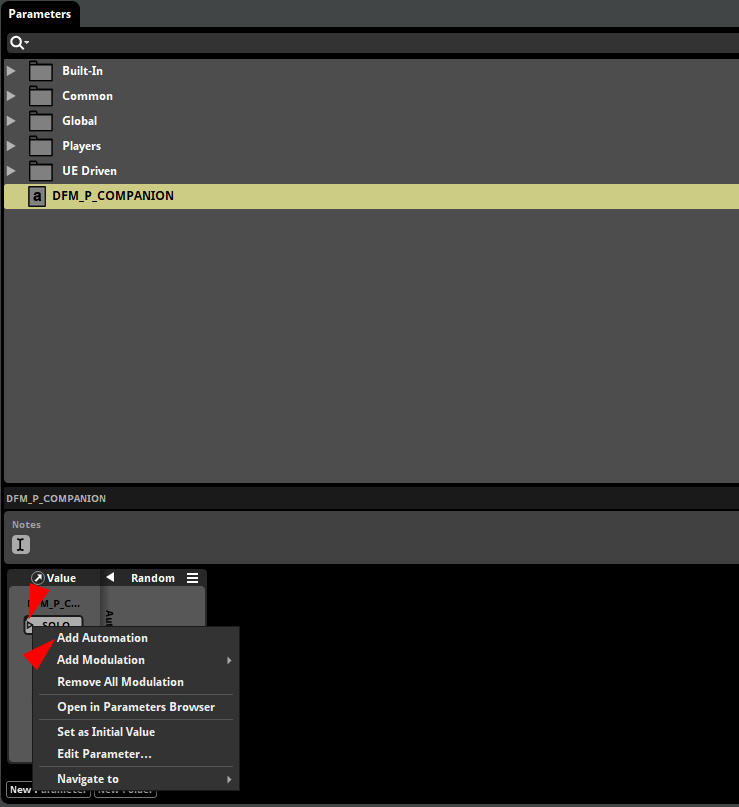
Wow so I typed out an essay with screenshots and everything explaining why I still don’t get it, and then right before submitting I discovered that you can right click on the word “value” in the command instrument and add automation to just that.
God damn I can’t tell if I’m a complete idiot, or if it’s FMOD’s fault for hiding menus. Probably both.
Either way, I finally got it and I am very grateful to you for your help and patience. This will be a huge time saver for me. Thank you.