Hello! I’m using Unity 6000.0.61f1 and FMOD 2.03.11 with Unity Version Control. There are multiple people working on the Unity project and I’m the one responsible for audio related things, such as implementing FMOD. (Edit: to be sure, Unity and FMOD Studio projects are in their own folders)
Before syncing and all that with Unity, I added the following lines to the ignore.conf file and checked in to our branch. Then I synced Unity and FMOD so other people in the Unity project can hear the sounds.
***
Never ignore DLLs in the FMOD subfolder.
!/[Aa]ssets/Plugins/FMOD/**/lib/*
Don’t ignore images and gizmos used by FMOD in the Unity Editor.
!/[Aa]ssets/Gizmos/FMOD/*
!/[Aa]ssets/Editor Default Resources/FMOD/*
Ignore the Cache folder since it is updated locally.
/[Aa]ssets/Plugins/FMOD/Cache/*
Ignore bank files in the StreamingAssets folder.
/[Aa]ssets/StreamingAssets//*.bank
/[Aa]ssets/StreamingAssets//*.bank.meta
Log files can be ignored.
fmod_editor.log
***
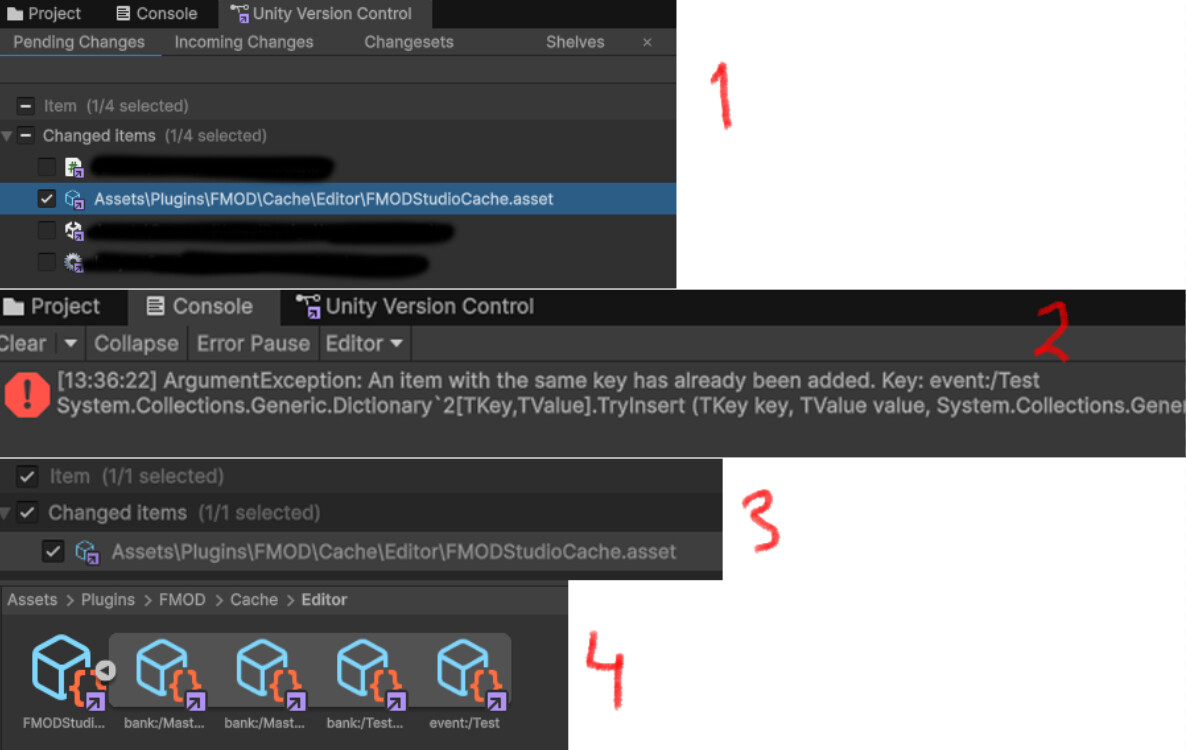
However I noticed FMODStudioCache.asset changes appearing and I’m not sure if those are “save or not” to have around, and I started to wonder if I’m missing some lines in the ignore.conf. (check 1 from image)
I didn’t first notice this in my workspace in pending changes until I updated my workspace with incoming changes that had checked in changes with it. After updating the workspace I get the following (check 2 from image).
This doesn’t seem to affect the project and when on Play mode, that doesn’t appear again on Unity’s console anymore and then it shows changes. (check 3 from image)
I tried to read some forums etc and some older posts have mentioned the following lines should be added in ignore.conf?
***
fmod.log
/Assets/Plugins/FMOD/Cache/Editor/FMODStudioCache.asset
/Assets/Plugins/FMOD/Cache/Editor/FMODStudioCache.asset.meta
/Assets/Plugins/FMOD/Cache/Editor.meta
***
I have understood that adding lines to ignore.conf after all this doesn’t make it ignore the following files but need “fresh slate” for it to work.
Based on some other posts I’m adding this following screenshot to show that there’s nothing else in the folder but these (Master bank, Master bank string, Test bank and Test event). (check 4 from image)
This might be a silly question but I am quite new to the technical side of things with Unity FMOD stuff, so I wanted to make sure I am doing things right (and I like to understand what’s happening, problem or not). I want to ensure as little of problems with FMOD as possible to help those in our team who might not have much experience in Unity, or especially with version control.
Not sure if it matters, but I think when I first setup FMOD in Unity, I had Source Type in FMOD Settings as FMOD Studio, and later changed it to Single Platform Build.