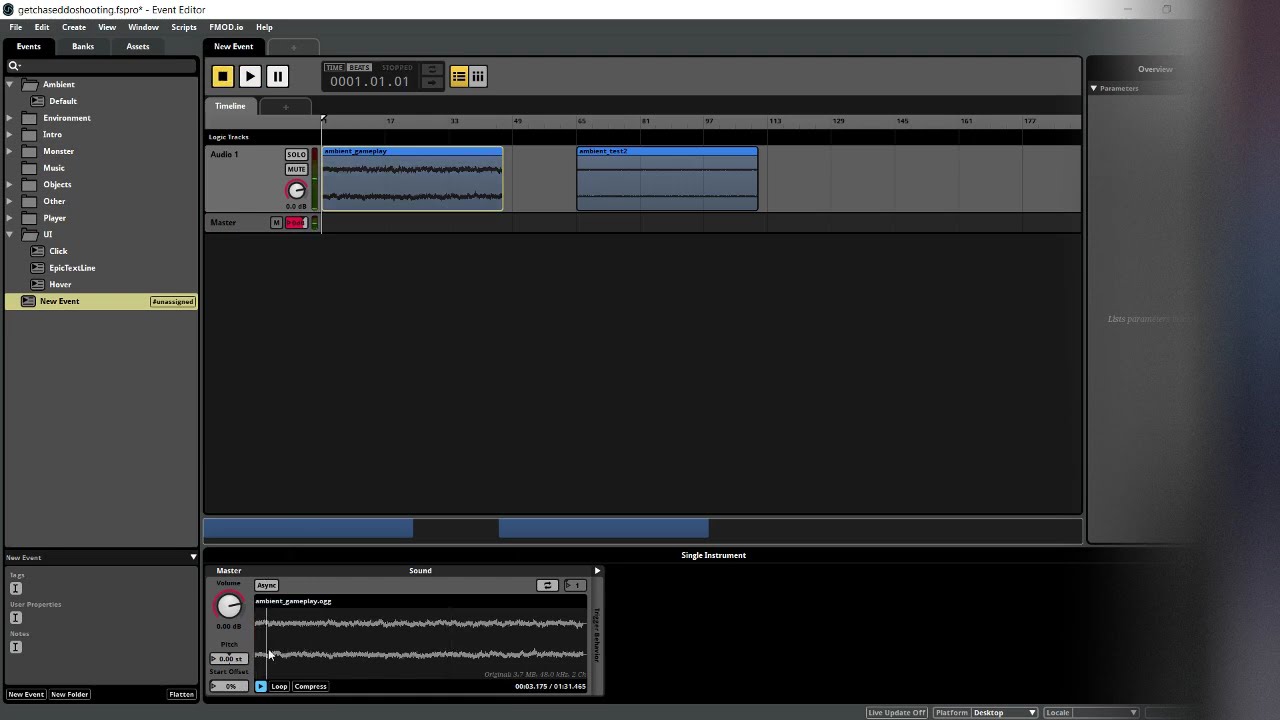
Noticed that my ambient loop produces strange audio distortion when played in Studio or in-game. It is definitely not in the audio file and it is also not heard in the “sound” window preview. The second file is the same loop but with some high-pass filter and it does not have this issue. Some bug related with low frequency data? Or do I not understand something?
Here’re the files and video:
FMOD Engine forums because I can hear the same distortions during game runtime.
EDIT: I can hear them in runtime only when live update is enabled! No distortion whatsoever when it is off. In FMOD Studio I hear them always as recorded on video. Studio version 2.02.14
After restarting FMOD Studio (and Unity project, not sure if it matters in this case), I can not reproduce the issue. I’m pretty sure I tried restarting FMOD Studio upon first encountering this several hours ago and it didn’t help effect. I might be misremembering that.
Anyway it’s not a critical issue for me in these circumstances but I uploaded the project in case you want to investigate. I was able to reproduce it in Ambient → Default event and in “New Event” without folder.
Also initially problem was noticed with the file “amb_default-006” and “ambient-gameplay” is just a re-render of it in Reaper with no fx (with some silence that I accidentally added). Even if I didn’t try restarting before it was reproducible with 2 separate files that have identical wavelength.
Im getting this in my unity project when I low pass sounds, im on 2.03.12 and no amount of restarting helps, it persists through all sessions and on all sounds and loops I have. Any more information on this ? - It sounds exactly the same as in the video with noise when lowpassing or pitching sounds low. Nothing is clipping or overly saturated.
This is only happening in your Unity project or when auditioning in FMOD Studio as well?
Would it be possible to package you FMOD Studio project with the settings listed above and upload it to your profile? Could I also please grab your Unity version?
I found out it was an EQ where the crossover frequency on the high end was set very low - making it do this exact behaviour - The EQ I had was shared across most of the events (Im making a music game where you mix events with each other) so almost every sound was affected. I could be the same case for the original poster