Scatterer spatialization still attenuated even when Event min/max distance are equal

Hello everyone!
I’m having a really hard time with spatialization using a Scatterer Instrument in FMOD, and I’m not sure whether I’m misunderstanding something or if this might be a bug. I’d really appreciate some clarification, so I’m bringing a recent example here.

I’m trying to create a spatial event that contains a Scatterer Instrument. The idea is that the sounds from this event should only be heard when the listener enters a specific listening area.

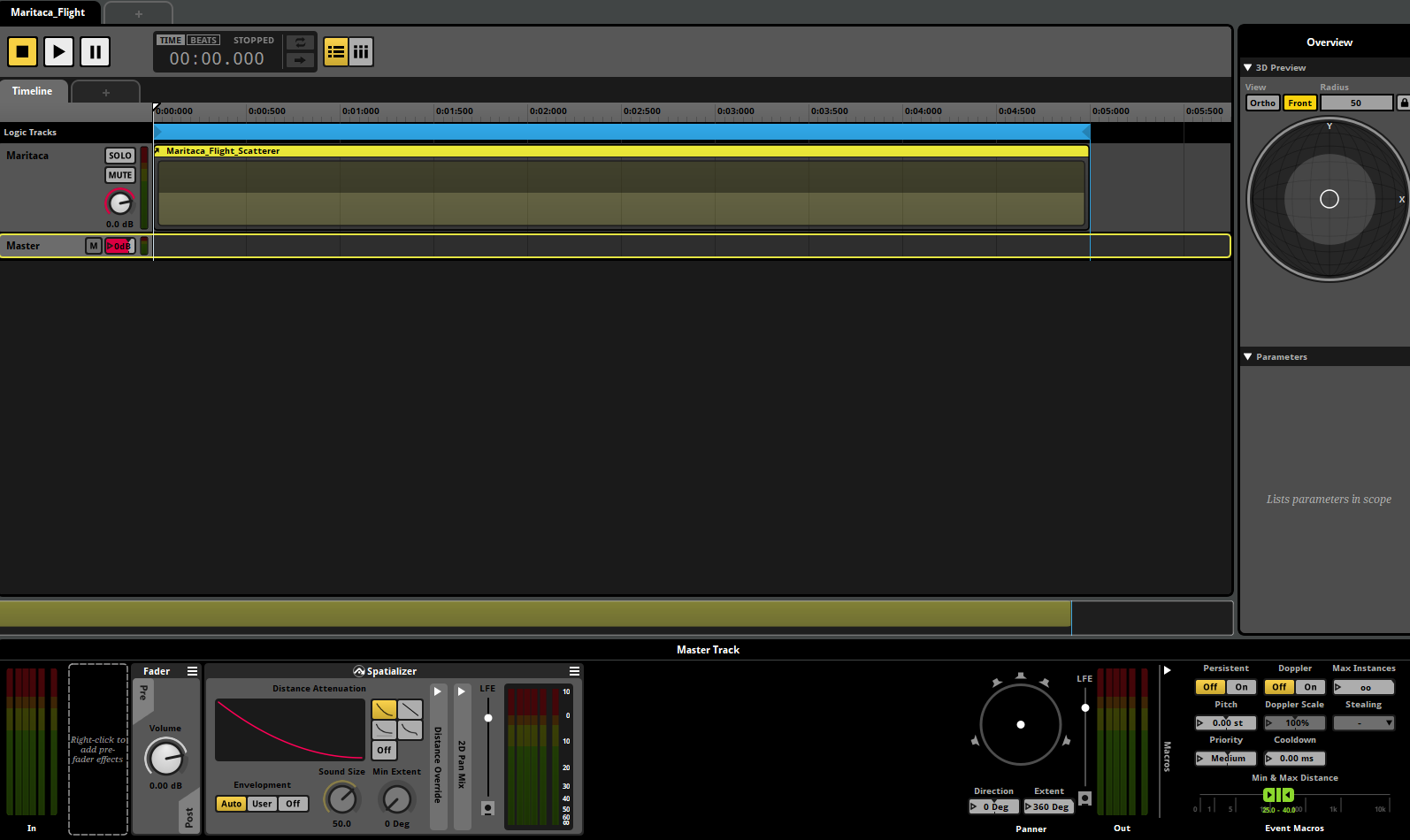
To do this, I added a Spatializer to the master track and set both the minimum and maximum distance to 25. In other words, as far as I understand, this creates a 3D object with no distance-based attenuation: once you enter the area, you hear the sound at full volume.

Based on my understanding of the Scatterer Instrument, I expect that this ‘full volume’ would still be relative to the distance defined by the Scatterer, since a zero distance would place the sounds as close as possible to the object’s origin (0, 0, 0) in Unity.

However, what I’m hearing does not match that expectation. The event still seems to be attenuated by distance, even though the event’s min and max distances are the same (I’ve tried setting this both in the Macro Controls and in the Spatializer Override).

I tested the same setup using a Single Instrument instead of a Scatterer and it worked exactly as expected, so I concluded the issue is related to the Scatterer. The only case where the attenuation does not happen is when the Scatterer min/max distance is set to 0/0.

Could someone help me understand what’s going on here? :slight_smile: **
**
In this screenshot, with the settings as shown, there is still distance attenuation happening and the sound is playing at a very low volume.

For extra context, I’m using FMOD integrated with Unity. The sound is played in the scene through an Event Emitter with Override disabled, it starts on Object Start and stops on Object Destroy.
Apologies for any mistakes in my writing, as English is not my native language.

A scatterer instrument adds a hidden spatializer effect to each and every instance of a single instrument that it spawns. It does this because otherwise the random positions assigned to those spawned single instrument instances would have no impact on their panning and attenuation.

If you want to prevent a scatterer instrument from adding hidden panners to the single instrument instances it spawns, set the scatterer instrument’s min and max scatter distance properties both to zero. Doing so disables that behavior.

Of course, that solution also prevents a scatterer instrument from randomizing the positions of its spawned instances. If that’s unsuitable for your use-case, please let us know what you’re trying to do in more detail, so that we can suggest an alternative solution that’s a better fit for your project’s requirements.

1 Like

Thank you very much for the explanation, it was extremely helpful!

In the time between my original question and your reply, I ended up building a workaround, but I am not sure if it is the most optimal approach.

My use case is a group of birds that only sing in a specific part of the forest, not everywhere in the map. What I did was create two events:

Bird_scatterer
Contains only a Scatterer instrument with the bird calls.

Bird_spatializer
Contains a Spatializer on the master track, and inside it I nest the Bird_scatterer event.

This way, I can define the spatialization and distance randomization only within a specific area of the world, while still using the Scatterer to spawn multiple birds call.

In the future I may need to use scripting to get more control over my ambience, but for now I am trying to understand and push FMOD Studio as far as I can.

Does this approach make sense from FMOD’s perspective, or is there a more appropriate or efficient way to handle this kind of localized ambient scatter?

Thanks again for your help!